

BIZOMAT ERP · Business Management SystemFormerly BIZOMAT System
One workspace for your company
Cloud ERP for small and medium businesses: sales, finance, projects, maintenance, engineering and administration, by company. Sign in once, choose the company, and open every module from the rail at the left of each screen.
Sign in with your BIZOMAT account. Every module opens inside the ERP.
Working today: the workspace, the dashboard by company, Sales and CRM, Finance and Accounting, Projects and Tasks, Products and Engineering (products, bills of materials, revisions, engineering changes, documents and CAD Automation), Procurement's supplier master, Maintenance (assets, requests and work orders), Reports and Administration. Purchase orders and receiving in the ERP, inventory, manufacturing, quality and supply chain are planned.
What it does
Your company, its people and its tools, on one screen
ERP (enterprise resource planning) is software that runs a business's main work in one system. BIZOMAT ERP brings BIZOMAT's tools together by company: each tool keeps its own records and permissions, and the ERP shows them side by side.
- Live
One sign-in
Your BIZOMAT account opens the ERP and every module in it. Signing in once is enough.
- Live
Work by company
The company switcher holds your registered companies, your own company and the companies that shared a tool with you.
- Connected
A dashboard for the company
Each of the company's tools on one screen, with the figures your role in that tool may see.
- Live
Every tool in one place
Sales and CRM, Finance and Accounting and Projects and Tasks open inside the ERP, with the module rail beside them.
- Live
Reports in one place
Every report of the company's tools, each opening in its module with that module's permissions.
- Live
Company administration
Company, people, departments, tool roles and settings, managed once for every tool.
What the labels mean
Every feature and module on this page carries one of these four labels.
- Live Works today in BIZOMAT.
- Connected Works today by linking two BIZOMAT systems, without copying records.
- In development Being built: parts exist, but it is not switched on for everyone yet.
- Planned Designed, not built. Not available today.
Who should use it
For everyone who runs, or works in, the business
Anyone with a BIZOMAT account can use it. What each person sees depends on their role in each tool.
- Owners and managers who want one view of sales, money and projects.
- Administrators who set up people, departments and access for every tool.
- Sales, finance and project staff who work in more than one tool.
- Bookkeepers, consultants and contractors who work for more than one company.
- Engineering teams that use CAD Automation with SOLIDWORKS and want its set-up beside the rest.
Problems it solves
What changes when the tools work as one
- Live
Separate logins and addresses for every tool.
One BIZOMAT account and one address, bizomat.ai/erp. The old tool addresses forward there.
- Live
Records of two businesses mixed together.
Every tool belongs to a company, and the company switcher keeps them apart. People outside a company cannot see it.
- Live
Access set tool by tool, and forgotten when people leave.
Invite a person once, with a role in each tool and their departments. Taking a role away takes them out of that tool.
- Connected
Typing the same customer into sales and accounts.
Link a CRM company to its Finance customer, and turn a won deal into a draft invoice, without copying records.
- Connected
No single view of how the business is going.
The dashboard shows each tool's figures, and Reports gathers every tool's reports.
Enterprise overview
How each department connects
Each team works in its own module, and the company's departments appear in every tool. What works today is labelled Live or Connected, what is being built In development, and what is designed but not built Planned.
| Team | Where it works | Status |
|---|---|---|
| Sales and account management | Sales and CRM | Live |
| Finance and bookkeeping | Finance and Accounting | Live |
| Project and operations teams | Projects and Tasks, and My Work | Live |
| Engineering and design | Products and Engineering, and the CAD Automation application | Live |
| Owners and managers | Dashboard and Reports, with each tool's figures | Connected |
| Administration | Administration: company, people, departments and tool roles | Live |
| Maintenance teams and technicians | Maintenance: asset register, requests and work orders | Live |
| Purchasing | Procurement: suppliers and their approval; purchase orders and bills in Finance and Accounting | Live |
| Stores, production and quality | Operations | Planned |
A department, in every tool
- Live
Made once, in Administration
Create a department, choose its head, and place it under another department if you like, to any depth.
- Connected
A team in Projects and Tasks
The same people, ready to assign work to and to filter by.
- Connected
A team in Sales and CRM
Led by the department's head. The CRM's dashboard and reports can be filtered by team.
- Connected
A department in Finance tracking
Tag income and costs to it, and set budgets by department.
- Connected
Totals on the company overview
Open tasks, open deals and income for each department, from every tool. A department's head sees that department's figures.
The business lifecycle, stage by stage
From product development to customer service, in order, with the system that serves each stage today.
Product development
BIZOMAT ERP Products and Engineering; BIZOMAT Engineering Automation
- Live CAD Automation in SOLIDWORKS
- Live Product records, revisions, changes and bills of materials
Sales
BIZOMAT CRM
- Live Leads, deals and follow-ups
- Connected Quotes in Finance from a deal
Procurement
BIZOMAT ERP Procurement (suppliers); Finance
- Live Suppliers with approval, linked to Finance
- Live Purchase orders and bills in Finance
- Planned Requisitions, quotations and receiving
Inventory
Planned
- Planned Stock on hand, movements and counts
Production
Planned
- Planned Work orders and planning
Quality
Planned
- Planned Inspections and nonconformances
Delivery
Planned
- Planned Sales orders, deliveries and shipments
Finance
BIZOMAT Finance
- Live Invoices, bills, ledger and reports
- Connected Draft invoices from won deals
Customer service
Planned; the CRM today
- Planned Customer returns
- Live The CRM's activities and customer history
Inventory, production, quality and delivery have no BIZOMAT system today. They are planned, and each is labelled Planned until it is built and tested.
Every feature, explained
What each part does, and what is planned
Enterprise dashboard
ConnectedThe company's tools on one screen: open tasks, overdue, due in 7 days and projects from Projects; open deals, pipeline, won in 30 days and follow-ups due from the CRM; income, expenses and what is owed both ways from Finance. Each tool's figures show only to people whose role in that tool may see them.
- Company dashboard with figures from each tool Connected
- Executive dashboards with widgets from every module Planned
Company and department management
LiveRegister a business with its ABN, or yourself in your own name. Give each person a company role (owner, administrator or member) and a role in each tool. Departments are made once, can sit under one another, and appear in every tool.
- Companies, people, roles and departments Live
- Departments in every tool Connected
- Sites, branches, approval rules and numbering Planned
Products and engineering
LiveThe product master with variants; multi-level bills of materials with where-used, revision comparison and cost roll-up; revisions released through change requests and change orders, approved by someone other than the person who drafted them; and engineering documents with versions, as files or as references to CAD files on the engineer's own computer. CAD Automation builds SOLIDWORKS parts, assemblies and drawings there, from your AI assistant.
- Products, variants and lifecycle Live
- Multi-level bills of materials, where-used and cost roll-up Live
- Revisions, change requests and change orders Live
- Engineering documents with versions and CAD references Live
- CAD Automation set-up steps Live
- The company's computers, reported by CAD Automation In development
- Sign in to CAD Automation with your BIZOMAT account In development
- Routings and stock availability Planned
Procurement
LivePartly live: the supplier master. Suppliers are approved, put on hold or blocked by a procurement manager who did not create them, with contacts, documents, terms and the products each supplies, and are linked to the supplier they are paid as in Finance. Purchase requisitions, requests for quotation, purchase orders with receiving and supplier performance are designed for Release 2.
- Supplier master with approval Live
- Purchase orders and bills in Finance Live
- Requisitions, quotations, receiving and supplier performance Planned
Inventory and warehouse
PlannedDesigned for stock on hand by product, location and lot, stock movements, goods receipts, transfers, counts and valuation. Not available today.
Manufacturing
PlannedDesigned for work orders with operations and materials, a planning board by work centre, and a shop-floor screen for quantities and scrap. Not available today.
Quality
PlannedDesigned for inspection plans and checklists, inspections, nonconformance reports and corrective actions. Not available today.
Supply chain
PlannedDesigned for sales orders from accepted quotes or won deals, deliveries with picking and packing, carriers, shipments and returns. Not available today.
Maintenance (asset management)
LiveA maintenance management system (CMMS) inside the ERP, with its own module in the rail, called Maintenance. Its first stage works today: assets, requests and work orders. Preventive maintenance and the rest are planned.
- Asset register and hierarchy Live
- Asset details and specifications Live
- Asset import from a CSV file, with a preview Live
- Maintenance requests with approval Live
- "Report a fault" from any ERP screen Live
- Work orders with tasks, parts and safety notes Live
- Technician assignment and maintenance roles Live
- A labour timer against the estimate Live
- Photos and documents Live
- A history of every change Live
- Preventive maintenance by time, usage or condition Planned
- Readings and thresholds Planned
- Inspections across several assets Planned
- Prestart checklists Planned
- Spare parts and stocktakes Planned
- Barcode and QR scanning Planned
- Several sites Planned
- Workload planning Planned
- An AI scheduling assistant that only proposes schedules for a person to approve Planned
- Reliability reporting (MTBF and MTTR) Planned
- Offline field work Planned
Reports
LiveSales and CRM reports (11 of them), Finance and Accounting reports (12, including the GST and BAS worksheet) and Projects and Tasks dashboards, gathered on one page. Each opens in its module, with that module's permissions.
- Every tool's reports in one place Live
- Company performance and operational reports across modules Planned
CRM and Finance connections
ConnectedThese work when the company runs both tools. Links never copy money: figures are read from Finance when asked.
- A CRM deal starts a draft quote in Finance Connected
- A won deal becomes a draft invoice Connected
- A CRM company is linked to its Finance customer, with its open invoices shown in the CRM Connected
Working and planned
Every module and its status
Live and Connected work today. In development is being built. Planned is designed, not built, and cannot be used.
| Module | Status | What you can do today |
|---|---|---|
| Dashboard | Connected | Each of the company's tools with the figures your role may see. |
| My Work | Live | Opens everything assigned to you in Projects and Tasks. |
| Sales and CRM | Live | Customers, leads, deals, activities, reports and automations. |
| Finance and Accounting | Live | Ledger, quotes, invoices, bills, statements, budgets, reports and the GST worksheet. |
| Projects and Tasks | Live | Boards, 9 views, documents, dashboards and automations. |
| Products and Engineering: CAD set-up | Live | The set-up steps, with links into CAD Automation. |
| Products and Engineering: the company's computers | In development | Shown once CAD Automation reports to the ERP. Until then the page says so and links to CAD Automation. |
| CAD Automation: sign in with your BIZOMAT account | In development | CAD Automation keeps its own sign-in for now. |
| Reports | Live | Every tool's reports in one place. |
| Administration | Live | Company, people, departments, tool roles and settings. |
| Links between tools | Connected | Deal to quote and draft invoice, deal to project, project costs, and a CRM company as a Finance customer. |
| Products and Engineering: products and bills of materials | Live | Products and variants, multi-level bills of materials, where-used, revision comparison and cost roll-up, with CSV exports. |
| Products and Engineering: revisions and changes | Live | Change requests and change orders, approved and released by an engineering approver who did not draft them. |
| Products and Engineering: documents | Live | Versions of drawings, models and specifications, as files or as references to CAD files on your own computer. |
| Procurement: suppliers | Live | The supplier master with approval, contacts, documents, the products each supplies and the link to Finance. |
| Procurement: requisitions, quotations, purchase orders and receiving | Planned | Not available in the ERP. Purchase orders and bills are in Finance today. |
| Inventory and Warehouse | Planned | Not available. |
| Manufacturing | Planned | Not available. |
| Quality | Planned | Not available. |
| Maintenance: asset register, requests and work orders | Live | The asset register and hierarchy, maintenance requests with approval, work orders with tasks and parts, technicians, a labour timer, photos and documents. |
| Maintenance: preventive maintenance and the rest | Planned | Not available. Preventive maintenance, readings, inspections, checklists, spare parts, scanning, multi-site, scheduling and reliability reporting. |
| Supply Chain | Planned | Not available. |
| Search across every module | Planned | Not available. Each tool has its own search. |
| Executive dashboards across modules | Planned | Not available beyond today's company dashboard. |
By business area
Enterprise capability matrix
Every business area an ERP covers, each feature with its status, and the BIZOMAT system that serves it. An area with no BIZOMAT system yet shows every feature as Planned.
16 business areas and 259 features: 81 live, 10 connected, 2 in development, 166 planned. Open an area to see each feature, its status and what it means today.
Enterprise management11 live, 1 connected, 6 planned
The company structure the other domains work in: companies, people, roles, departments and the shared ERP workspace.
Served by: BIZOMAT ERP (Administration) and Company accounts
| Feature | Status | Today |
|---|---|---|
| BIZOMAT ERP workspace | Live | Every tool opens inside the ERP with one module rail and one sign-in. |
| Multiple companies | Live | A person can belong to several registered companies and switch between them in the ERP. |
| Own company for every person | Live | Not registered. It holds the tools a person owns outside a registered company. |
| Company registration with checks | Live | ABN check digit, and a register lookup only when it is switched on; email confirmation; Australian phone and postcode rules. Phone numbers are never called verified. |
| Subsidiaries | Planned | There are no parent and child companies yet. |
| Legal entities | Planned | One registered company is one entity today. |
| Sites and branches | Planned | Designed, not built. Not available today. |
| Departments | Live | Nested to any depth, each with a head. |
| Departments in every tool | Connected | A department is a team in Projects and the CRM and a tracking department in Finance. |
| Cost centres | Live | A Finance tracking category. Not yet shared with the other systems. |
| Intercompany transactions | Planned | Designed, not built. Not available today. |
| Multi-currency | Planned | Each Finance workspace and CRM organisation uses one currency. Project budgets in Projects support 11 currencies. |
| Localisation | Live | Australia only: ABN and ACN checks, GST tax codes with BAS labels, Australian phone and postcode rules. Other countries are planned. |
| Business policies | Planned | Finance has its own approval settings and period lock. Company-wide policies are planned. |
| User and role management | Live | Company roles (owner, administrator, member) and a role in each tool. Each tool keeps its own roles and checks them. |
| Invitations with tool roles and departments | Live | Works today in BIZOMAT. |
| Tools grouped by company | Live | A tool shared with someone outside its company shows under that company as Shared with you. |
| Platform console | Live | For platform administrators only: accounts, companies and activity across the tools. |
Finance and controlling13 live, 6 planned
The ledger, what is owed both ways, cash, budgets, tax and the reports that come from posted entries.
Served by: BIZOMAT Finance
| Feature | Status | Today |
|---|---|---|
| General ledger | Live | Double-entry. The database refuses unbalanced postings, postings into locked periods and changes to posted journals. |
| Chart of accounts and tax codes | Live | Works today in BIZOMAT. |
| Accounts payable | Live | Bills, purchase orders to bills, payments recorded and aged payables. No payment is made from BIZOMAT. |
| Accounts receivable | Live | Invoices, credit notes, payments recorded and aged receivables. No payment is collected by BIZOMAT. |
| Expense claims | Live | Works today in BIZOMAT. |
| Asset accounting | Planned | Fixed assets and depreciation come in a later stage of Finance. |
| Cash management | Live | Money accounts, statement import (CSV, OFX, QIF), matching, rules and reconciliation. No bank connection. |
| Bank feeds | Planned | Needs an approved provider. None is chosen, and Finance never connects to a bank today. |
| Treasury | Planned | No payments, investments, borrowing or hedging. |
| Financial consolidation | Planned | Needs legal entities and multi-currency first. |
| Management accounting | Live | Reports filtered by department, project and cost centre. |
| Cost accounting | Planned | No cost allocation, standard costs or activity rates yet. |
| Profitability analysis | Live | Profit and loss by department, project or cost centre. By product or customer is planned. |
| Budgets | Live | Monthly budgets by account, department, project or cost centre, with budget against actual. |
| Forecasts | Live | Cash flow forecast. Financial planning scenarios are planned. |
| Tax and regulatory reporting | Live | GST and BAS worksheet only. BIZOMAT does not lodge with the ATO and is not a certified tax product. |
| BAS module with lodged-period snapshots | Planned | A later stage of Finance. Lodgement stays with the business or its agent. |
| Financial statements and reports | Live | 12 reports from posted journals, with CSV and PDF. |
| Period lock and audit trail | Live | Works today in BIZOMAT. |
Sales and distribution7 live, 3 connected, 9 planned
From the first lead to the paid invoice: customers, opportunities, quotes, orders, deliveries and billing.
Served by: BIZOMAT CRM and BIZOMAT Finance; sales orders, deliveries and returns in BIZOMAT ERP (planned module)
| Feature | Status | Today |
|---|---|---|
| Customer relationship management (CRM) | Live | Organisations, companies, contacts, activities, timelines, automations, search and saved views. |
| Leads | Live | Statuses, an explainable score and conversion to a contact, company and deal in one step. |
| Opportunities | Live | Deals in several pipelines with custom stages, products and weighted value. |
| One customer record across CRM and Finance | Connected | A CRM company is linked once to the Finance customer it is billed as; open invoices and the amount owed show in the CRM. |
| Quotes | Live | Finance quotes with versions kept as sent, online acceptance, expiry and progress invoicing. |
| Quote from a CRM deal | Connected | The deal lists its quotes, and each step shows on the deal timeline without amounts. |
| Sales product and service catalogue | Live | CRM products with code and unit price, used on deals. |
| Pricing | Planned | Prices are entered per line or come from the CRM catalogue. Price lists and pricing rules are planned. |
| Sales contracts | Planned | Designed, not built. Not available today. |
| Sales orders | Planned | Designed, not built. Not available today. |
| Order management | Planned | Designed, not built. Not available today. |
| Credit management | Planned | Payment terms and aged receivables exist in Finance. Credit limits and holds are planned. |
| Deliveries | Planned | Designed, not built. Not available today. |
| Billing | Live | Finance invoices, progress invoices from quotes, recurring invoices and secure online links. |
| Won deal to draft invoice | Connected | A draft only, once per deal. Finance approval posts it. |
| Returns | Planned | Finance credit notes are live. Returns of goods are planned. |
| Rebates | Planned | Designed, not built. Not available today. |
| Customer service | Planned | CRM activities and timelines record contact with customers. Cases and service levels are planned. |
| Sales forecast and reports | Live | CRM dashboard and 11 reports, including the weighted and commit forecast. |
Sourcing and procurement4 live, 9 planned
Choosing suppliers, asking for prices, ordering, receiving and matching what was ordered, received and billed.
Served by: BIZOMAT ERP Procurement (the supplier master); BIZOMAT Finance (purchase orders, bills)
| Feature | Status | Today |
|---|---|---|
| Supplier master | Live | Suppliers with approval, hold and block by a procurement manager who did not create them, contacts, documents, payment terms, lead times and the products each supplies. Linked, not copied, to the Finance supplier they are paid as. An ABN is checked for its form only. |
| Supplier qualification | Planned | Designed, not built. Not available today. |
| Requests for quotation (RFQs) | Planned | Designed, not built. Not available today. |
| Supplier comparisons | Planned | Designed, not built. Not available today. |
| Supplier contracts | Planned | Designed, not built. Not available today. |
| Purchase requisitions | Planned | Designed, not built. Not available today. |
| Purchase orders | Live | A Finance document with numbering, approval and PDF. Product lines, sites and receiving are planned. |
| Purchase order to bill | Live | Works today in BIZOMAT. |
| Purchase scheduling | Planned | Designed, not built. Not available today. |
| Goods receipts | Planned | Designed, not built. Not available today. |
| Three-way matching | Planned | Needs goods receipts. |
| Supplier invoices | Live | Finance bills with approval and payments recorded. No payment is made from BIZOMAT. |
| Supplier performance | Planned | Measured from purchase orders and receipts (Release 2). |
Product lifecycle and engineering12 live, 1 in development, 7 planned
Products from design to release: product records, CAD models and drawings, bills of materials, revisions and changes.
Served by: BIZOMAT ERP Products and Engineering; BIZOMAT Engineering Automation (CAD Automation)
| Feature | Status | Today |
|---|---|---|
| Product master | Live | Numbered products with type, category, unit, costs, price, physical details, lifecycle stage and effective dates, images and attachments. The CRM product catalogue still serves deals on its own. |
| Product classification | Planned | Designed, not built. Not available today. |
| Variants and configurations | Live | A variant is a product of its own that records what sets it apart: size, model, configuration, material, finish or options. |
| Specifications | Planned | Designed, not built. Not available today. |
| Parts and assemblies in SOLIDWORKS | Live | CAD Automation builds native features on the engineer's own computer from an AI assistant. Tested through a simulated SOLIDWORKS; field testing on Windows with SOLIDWORKS 2022 is the next milestone. |
| Engineering drawings | Live | Native SOLIDWORKS drawings through CAD Automation, exported as PDF, DWG or DXF. Released drawings are not kept as ERP records yet. |
| CAD integration | Live | CAD Automation's connector, add-in and Companion. Its setup is in the ERP under Products and Engineering. |
| CAD computers and jobs in the ERP | In development | The ERP side is built. CAD Automation does not report yet, and the ERP page says so. |
| Design checks | Live | Measuring, inspection and interference checks through CAD Automation. |
| Model import and export | Live | STEP, IGES and Parasolid in; STEP, STL, Parasolid and IGES out. |
| Bill of materials (BOM) management | Live | Lines with quantity, unit, scrap allowance, reference designators, position, effective dates, optional lines and alternatives. A bill of materials belongs to a revision and locks when it is released. |
| Multi-level BOM | Live | Explosion through every level, where-used, comparison of two revisions and material cost roll-up, with missing costs flagged. Loops are refused. Availability needs Inventory (planned). |
| Routings | Planned | Designed, not built. Not available today. |
| Engineering revisions | Live | Draft, in a change order, released and superseded. A release supersedes the previous revision in the same step. |
| Engineering change requests and orders (ECR and ECO) | Live | Approved and released by an engineering approver who did not draft the change order; in a company of one, the exception is recorded. |
| Document management | Live | Engineering documents per product and revision, with versions and approval: an uploaded file, or a reference to a CAD file on the engineer's own computer. DXF and STEP files are checked and only ever downloaded. |
| Product costing | Planned | Designed, not built. Not available today. |
| Lifecycle status | Planned | Designed, not built. Not available today. |
| Compliance | Planned | Designed, not built. Not available today. |
| Drawing generated from an ERP product | Planned | Needs Sign in with BIZOMAT in CAD Automation. Engineering documents can reference a CAD file today. |
Manufacturing20 planned
Planning and making products: production orders, materials, capacity, the shop floor and production cost.
Served by: BIZOMAT ERP Manufacturing (planned module)
| Feature | Status | Today |
|---|---|---|
| Discrete manufacturing | Planned | Designed, not built. Not available today. |
| Process manufacturing | Planned | After discrete manufacturing: needs formulas and batch records. |
| Repetitive manufacturing | Planned | Designed, not built. Not available today. |
| Make to stock | Planned | Designed, not built. Not available today. |
| Make to order | Planned | Designed, not built. Not available today. |
| Engineer to order | Planned | Today a deal can start a project in Projects to track the work, without production records. |
| Project manufacturing | Planned | Designed, not built. Not available today. |
| Master production scheduling | Planned | Designed, not built. Not available today. |
| Material requirements planning (MRP) | Planned | Designed, not built. Not available today. |
| Capacity planning | Planned | Designed, not built. Not available today. |
| Advanced planning and scheduling | Planned | Designed, not built. Not available today. |
| Production orders | Planned | Designed, not built. Not available today. |
| Job management | Planned | Designed, not built. Not available today. |
| Shop-floor control | Planned | Designed, not built. Not available today. |
| Manufacturing execution (MES) | Planned | Designed, not built. Not available today. |
| Labour and machine tracking | Planned | Designed, not built. Not available today. |
| Work in progress (WIP) | Planned | Designed, not built. Not available today. |
| Scrap and rework | Planned | Designed, not built. Not available today. |
| Production costing | Planned | Designed, not built. Not available today. |
| Overall equipment effectiveness (OEE) | Planned | Designed, not built. Not available today. |
Inventory and warehousing17 planned
What is in stock, where it is, how it moves and what it is worth.
Served by: BIZOMAT ERP Inventory and Warehouse (planned module), valued in BIZOMAT Finance
| Feature | Status | Today |
|---|---|---|
| Multi-warehouse | Planned | Designed, not built. Not available today. |
| Bins and locations | Planned | Designed, not built. Not available today. |
| Raw materials | Planned | Designed, not built. Not available today. |
| Work in progress stock | Planned | Designed, not built. Not available today. |
| Finished goods | Planned | Designed, not built. Not available today. |
| Stock movements | Planned | Designed, not built. Not available today. |
| Batch and lot tracking | Planned | Designed, not built. Not available today. |
| Serial numbers | Planned | Designed, not built. Not available today. |
| Barcodes | Planned | Designed, not built. Not available today. |
| QR scanning | Planned | Designed, not built. Not available today. |
| Reservations | Planned | Designed, not built. Not available today. |
| Stock valuation | Planned | Valuation journals will be posted through Finance. Finance keeps no stock today. |
| Cycle counts | Planned | Designed, not built. Not available today. |
| Picking and packing | Planned | Designed, not built. Not available today. |
| Receiving | Planned | Designed, not built. Not available today. |
| Dispatch | Planned | Designed, not built. Not available today. |
| Replenishment | Planned | Designed, not built. Not available today. |
Supply chain and logistics12 planned
Planning demand and supply, and moving goods between suppliers, sites and customers.
Served by: BIZOMAT ERP Supply Chain (planned module)
| Feature | Status | Today |
|---|---|---|
| Demand planning | Planned | Designed, not built. Not available today. |
| Supply planning | Planned | Designed, not built. Not available today. |
| Material planning | Planned | Designed, not built. Not available today. |
| Inventory optimisation | Planned | Designed, not built. Not available today. |
| Warehouse management | Planned | The warehouse operations of Inventory and Warehouse. |
| Transportation management | Planned | Designed, not built. Not available today. |
| Freight | Planned | Designed, not built. Not available today. |
| Shipment tracking | Planned | Tracking references first; connections to carriers come later. |
| Landed costs | Planned | Designed, not built. Not available today. |
| Distribution | Planned | Designed, not built. Not available today. |
| Backorders | Planned | Designed, not built. Not available today. |
| Inter-site transfers | Planned | Designed, not built. Not available today. |
Quality management13 planned
Inspections, nonconformances and corrective actions, from suppliers to finished products.
Served by: BIZOMAT ERP Quality (planned module)
| Feature | Status | Today |
|---|---|---|
| Supplier quality | Planned | Designed, not built. Not available today. |
| Incoming inspection | Planned | Designed, not built. Not available today. |
| In-process inspection | Planned | Designed, not built. Not available today. |
| Final inspection | Planned | Designed, not built. Not available today. |
| Quality plans | Planned | Designed, not built. Not available today. |
| Nonconformance reports (NCR) | Planned | Designed, not built. Not available today. |
| Corrective and preventive actions (CAPA) | Planned | Actions will be tasks in Projects. |
| Statistical process control (SPC) | Planned | Designed, not built. Not available today. |
| Calibration | Planned | Designed, not built. Not available today. |
| Quality audits | Planned | Designed, not built. Not available today. |
| Traceability | Planned | Designed, not built. Not available today. |
| Product compliance | Planned | Designed, not built. Not available today. |
| Quality reporting | Planned | Designed, not built. Not available today. |
Asset management and maintenance10 live, 25 planned
A maintenance management system (CMMS): assets, requests, work orders, technicians, preventive plans, parts and reliability.
Served by: BIZOMAT ERP Asset Management and Maintenance (Stage 1 live); depreciation in BIZOMAT Finance (planned)
| Feature | Status | Today |
|---|---|---|
| Asset register | Live | Works today in BIZOMAT. |
| Asset hierarchy | Live | Assets within assets and locations. |
| Equipment master and asset details | Live | Works today in BIZOMAT. |
| Maintenance requests with approval | Live | Approval by a supervisor or administrator when the company requires it. |
| Maintenance work orders | Live | Standard work orders with tasks, required parts as text lines, labour and notes. Recurring work orders from plans are planned. |
| Corrective maintenance | Live | A standard work order of the corrective job type. |
| Breakdown maintenance | Live | A standard work order of the breakdown job type. |
| Technician assignment | Live | Maintenance roles per company: administrator, supervisor, technician and requester. |
| Labour timer | Live | Works today in BIZOMAT. |
| Photos and documents | Live | On assets, requests and work orders. |
| Preventive maintenance plans | Planned | Triggered by time, usage or condition. |
| Maintenance planning and calendar | Planned | Designed, not built. Not available today. |
| Recurring work orders | Planned | Designed, not built. Not available today. |
| Asset readings and meters | Planned | Readings with thresholds and trend charts. |
| Condition monitoring | Planned | From readings and thresholds first; sensor feeds come with IoT integrations. |
| Threshold alerts | Planned | Designed, not built. Not available today. |
| Work order inspections | Planned | Checklists across several assets: pass, fail, observation, not applicable, number, text, photo and signature. A failed answer can raise a request or a work order by rule. |
| Digital prestart checklists | Planned | Designed, not built. Not available today. |
| Spare parts and stores | Planned | Through ERP Inventory and Procurement: minimum and maximum, reorder points, reservations, issues and returns to work orders. Stage 1 records required parts as text only. |
| Maintenance stocktakes | Planned | With approval, through the central inventory service. |
| Barcode and QR scanning | Planned | For assets and parts. |
| Multi-site maintenance | Planned | Designed, not built. Not available today. |
| Fuel records | Planned | Designed, not built. Not available today. |
| Trades and technician workload planning | Planned | Designed, not built. Not available today. |
| AI scheduling assistant | Planned | Proposes schedules only, with a preview, an explanation and a comparison. A person edits, accepts or rejects each one, and the history is kept. |
| Reliability reporting | Planned | Mean time between failures and to repair, failure frequency, preventive maintenance compliance, repeat failures and cost by asset and department, with exports. |
| Downtime | Planned | Designed, not built. Not available today. |
| Predictive maintenance | Planned | Designed, not built. Not available today. |
| IoT integrations | Planned | Designed, not built. Not available today. |
| Offline field operation | Planned | Not offered until the offline queue, reconnection, conflict resolution and audit are tested. |
| Lifecycle costs | Planned | Labour, parts and contractor costs per asset over its life. |
| Maintenance administration centre | Planned | Custom and mandatory fields, labels, categories, job types, priorities, approval rules, templates, field-level edit rights and an audit of configuration changes. Stage 1 has maintenance roles and one approval setting. |
| Maintenance costs in Finance | Planned | Labour, parts and contractor costs as expense allocations, with references to fixed assets. |
| Shutdown projects in Projects | Planned | Designed, not built. Not available today. |
| Drawings and manuals from Engineering | Planned | Designed, not built. Not available today. |
Project and portfolio management9 live, 4 connected, 3 planned
Planning, running and costing projects, with tasks, schedules, budgets and the figures from Finance.
Served by: BIZOMAT Projects, with costs from BIZOMAT Finance
| Feature | Status | Today |
|---|---|---|
| Portfolios | Planned | Folders, dashboards across boards and goals exist. Portfolio management is planned. |
| Project planning | Live | Boards, timeline and Gantt, typed dependencies, critical path scheduling and working calendars. |
| Work breakdown structure (WBS) | Live | WBS numbers from groups, tasks and subtasks in the schedule. |
| Milestones | Live | Works today in BIZOMAT. |
| Baselines and earned value | Live | Works today in BIZOMAT. |
| Project budgets | Live | Approved, estimated, actual and committed amounts per project. |
| Resources | Live | People assigned to tasks, the workload view and work units on scheduled tasks. Resource pools, skills and rates are planned. |
| Timesheets | Live | Time tracked on tasks. Timesheet approval is planned. |
| Project procurement | Planned | Designed, not built. Not available today. |
| Project costing | Connected | Income and costs posted to the project's Finance tracking project, plus cost entries in Projects. |
| Project billing | Planned | Progress invoices from a Finance quote are live. Billing from project time or milestones is planned. |
| Project profitability | Connected | Income, costs and remaining budget from Finance, on the company's projects page. |
| Deal to project | Connected | A CRM deal starts a project in the company's Projects workspace, once per deal. |
| CRM activity to task | Connected | A CRM activity becomes a task in a project, linked back to the CRM. |
| Project documents | Live | Documents with versions, comments and links to boards and tasks. |
| Project reports and dashboards | Live | Eight report types (PDF, Excel, HTML, CSV) and dashboards with 11 widget types. |
Service management10 planned
After-sales service: cases, contracts, warranty, service orders, field work and repairs.
Served by: BIZOMAT ERP Service (planned module), with customers in BIZOMAT CRM
| Feature | Status | Today |
|---|---|---|
| Customer service cases | Planned | CRM activities and timelines record contact with customers today. |
| Service contracts | Planned | Designed, not built. Not available today. |
| Warranty | Planned | Designed, not built. Not available today. |
| Service orders | Planned | Designed, not built. Not available today. |
| Field service | Planned | Designed, not built. Not available today. |
| Technician scheduling | Planned | Designed, not built. Not available today. |
| Repairs | Planned | Designed, not built. Not available today. |
| Return material authorisation (RMA) | Planned | Designed, not built. Not available today. |
| Service spare parts | Planned | Designed, not built. Not available today. |
| Service history | Planned | The CRM timeline holds each customer's activities, notes and documents. History by product or asset is planned. |
Human capital management1 live, 11 planned
Employees and their organisation, skills, time and development.
Served by: BIZOMAT ERP People (planned module), with people and departments in Company accounts
| Feature | Status | Today |
|---|---|---|
| Employees | Planned | People in a company are accounts with roles, not employee records. |
| Organisation structures | Live | Nested departments with heads. Positions and reporting lines are planned. |
| Recruitment | Planned | Designed, not built. Not available today. |
| Onboarding | Planned | Invitations give a new person their company and tool roles today. HR onboarding is planned. |
| Training | Planned | Designed, not built. Not available today. |
| Qualifications | Planned | Designed, not built. Not available today. |
| Workforce scheduling | Planned | Designed, not built. Not available today. |
| Attendance | Planned | Designed, not built. Not available today. |
| Leave | Planned | Designed, not built. Not available today. |
| Payroll | Planned | BIZOMAT does not run payroll, PAYG withholding or Single Touch Payroll. It would need its own approved design and provider. |
| Superannuation | Planned | Not offered. It depends on payroll. |
| Performance | Planned | Designed, not built. Not available today. |
Governance and compliance3 live, 7 planned
Controls, approvals, audit and the security of the data the other domains keep.
Served by: BIZOMAT ERP Administration, with each system's own controls
| Feature | Status | Today |
|---|---|---|
| Internal controls | Live | In Finance: approvals, the period lock and ledger integrity enforced by the database. Company-wide controls are planned. |
| Segregation of duties | Planned | Finance roles already separate people who submit from people who approve. Company-wide rules are planned. |
| Approval limits | Planned | Finance approval is by record type and role, not by amount. |
| Audit trails | Live | Each system keeps its own audit log, and the platform console shows activity across them. One audit view for a company is planned. |
| Risk management | Planned | Designed, not built. Not available today. |
| Policy management | Planned | Designed, not built. Not available today. |
| Regulatory records | Planned | Designed, not built. Not available today. |
| Document retention | Planned | Deleted Finance documents are kept for the audit trail. Retention rules are planned. |
| Data security | Live | Every query is limited to the person's company or organisation, records of others answer as not found, unsafe requests need a CSRF token, and downloads are sandboxed. |
| Access reviews | Planned | People and roles are listed per company and in the platform console. Scheduled reviews are planned. |
Enterprise analytics and AI4 live, 2 connected, 7 planned
Dashboards, reports and analysis across the domains, and AI that helps without acting on its own.
Served by: BIZOMAT ERP Dashboard and Reports
| Feature | Status | Today |
|---|---|---|
| Executive dashboards | Connected | The ERP dashboard shows each company's figures read from Projects, the CRM and Finance. Role dashboards are planned. |
| Department dashboards | Connected | The company overview shows totals for each department from each tool. |
| Reports hub | Live | Every report of the company's tools in one place. Each opens in its own module with its own permissions. |
| Operational KPIs | Planned | Each tool's own dashboard is live. Measures across modules, such as on-time delivery, are planned. |
| Financial analytics | Live | The Finance dashboard and reports. |
| Sales analytics | Live | The CRM dashboard and reports. |
| Production analytics | Planned | Designed, not built. Not available today. |
| Predictive forecasting | Planned | Designed, not built. Not available today. |
| Exception detection | Planned | Rule-based alerts exist in Finance (due, overdue, budgets nearly spent) and the CRM (overdue follow-ups). |
| AI business assistant | Planned | AI apps work in SOLIDWORKS through CAD Automation, and AI Search covers the public website. An assistant over ERP records is planned. |
| Workflow automation | Live | Inside Projects and the CRM (automations) and Finance (recurring records and alerts). Automation across systems is planned. |
| Natural-language reporting | Planned | Designed, not built. Not available today. |
| Controlled AI actions | Planned | AI actions on ERP records will be proposals a person approves. CAD Automation already limits AI apps to its own tools, acting as the signed-in person. |
Enterprise integration platform7 live, 1 in development, 4 planned
How the systems connect to each other and to the outside: APIs, events, identity, documents and extensions.
Served by: BIZOMAT ERP platform: the shared API and the BIZOMAT sign-in
| Feature | Status | Today |
|---|---|---|
| APIs | Live | Each system's API, used with the session or a personal API token. A published API reference and scoped tokens are planned. |
| Webhooks | Live | Signed outgoing webhooks from Projects, and messages to Slack and Microsoft Teams. Not yet from the CRM, Finance or the ERP. |
| Event processing | Planned | An event outbox for reactions between modules. |
| Document exchange | Live | Secure online links for quotes, invoices and credit notes; customers accept quotes online. E-invoicing is planned. |
| Electronic data interchange (EDI) | Planned | Designed, not built. Not available today. |
| External connections | Live | Email through the platform's email provider, Slack and Microsoft Teams, and AI apps through CAD Automation. No bank, payment, carrier or mailbox connections. |
| Identity and access management | Live | One BIZOMAT account and session for every system in the ERP, with email confirmation and personal API tokens. |
| Sign in with BIZOMAT for CAD Automation | In development | The BIZOMAT side is built. CAD Automation's side is built and not yet released. |
| Extensible workflows | Planned | Automations inside Projects and the CRM are live. Workflows that span systems are planned. |
| Custom fields | Live | In Projects (25 column types) and the CRM (11 field types). Not yet in Finance or ERP records. |
| Custom reports | Live | Projects dashboards built from board data, and saved views in Projects and the CRM. A report designer across systems is planned. |
| Integration monitoring | Planned | Projects records each webhook delivery and its result. One monitor for every connection is planned. |
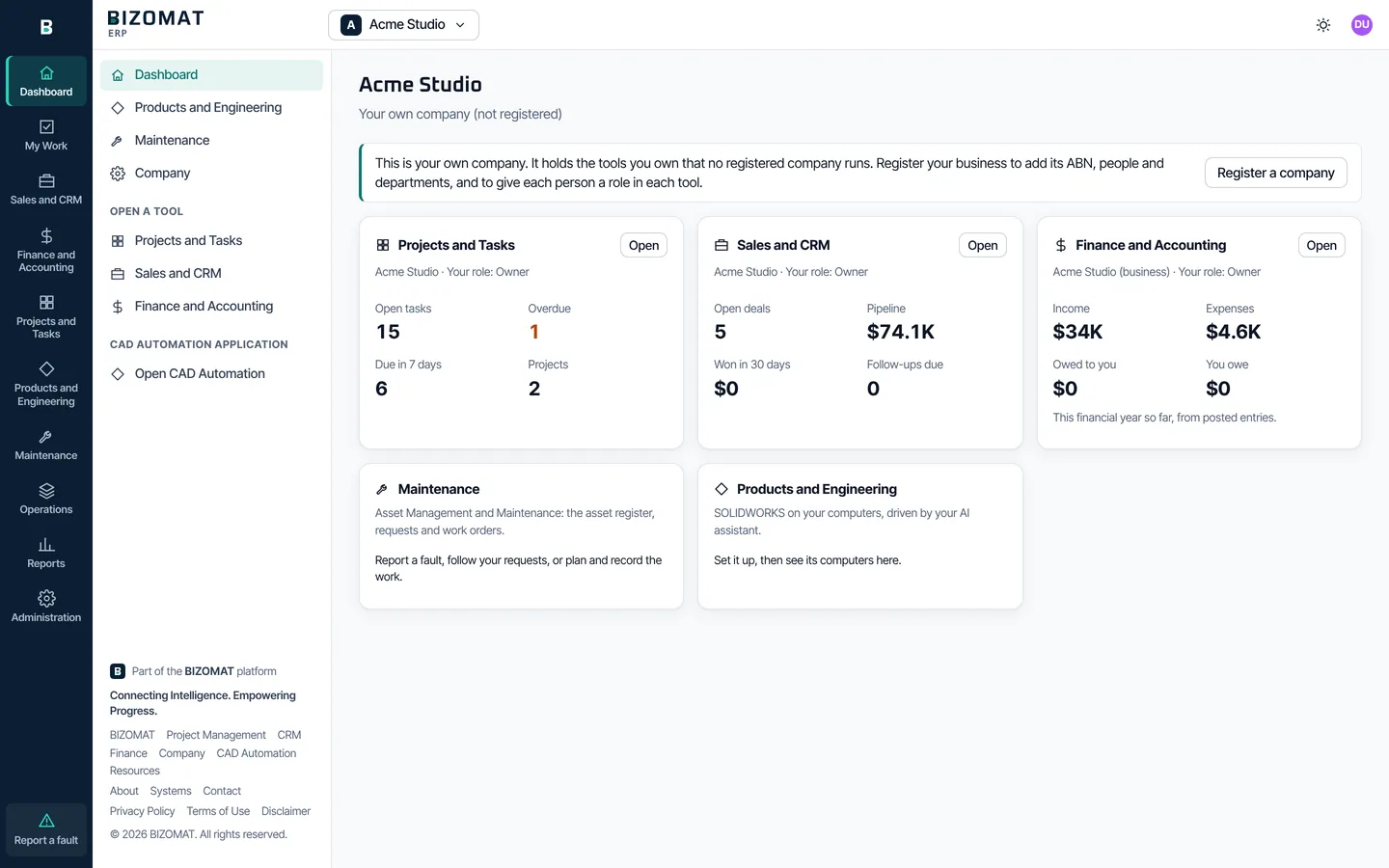
The main dashboard
What the dashboard shows
The first screen after you sign in. It opens on the company you used last.
The company switcher Live
At the top. Your companies first, then "Shared with you". Register a company starts a new one.
The company's kind and your role Live
Under its name: a registered company with your role, your own company (not registered), or shared with you, with only the tools you were added to.
A card for each tool Connected
Its name, your role and Open. Projects: open tasks, overdue, due in 7 days, projects. CRM: open deals, pipeline, won in 30 days, follow-ups due. Finance: income, expenses, owed to you and you owe, this financial year from posted entries. A role that may not see the figures sees a note instead.
The Products and Engineering and Procurement cards Live
Open the product master and the suppliers. CAD Automation's set-up steps are a tab of Products and Engineering, with the computers once CAD Automation reports.
People and the rail Live
How many people are in the company. The module rail sits at the left (along the bottom on a phone); the side menu lists the company's tools.
What it looks like
The real product
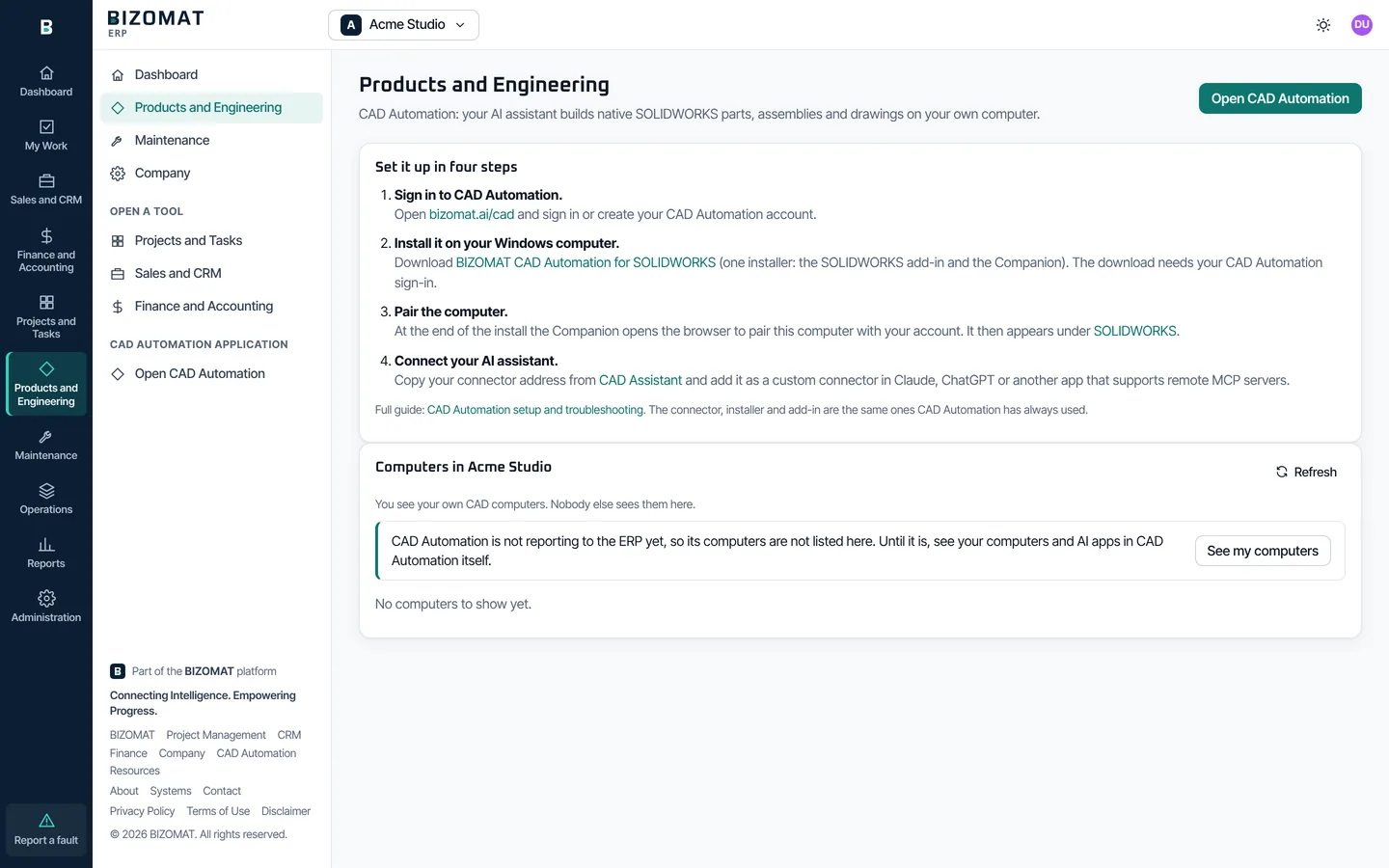
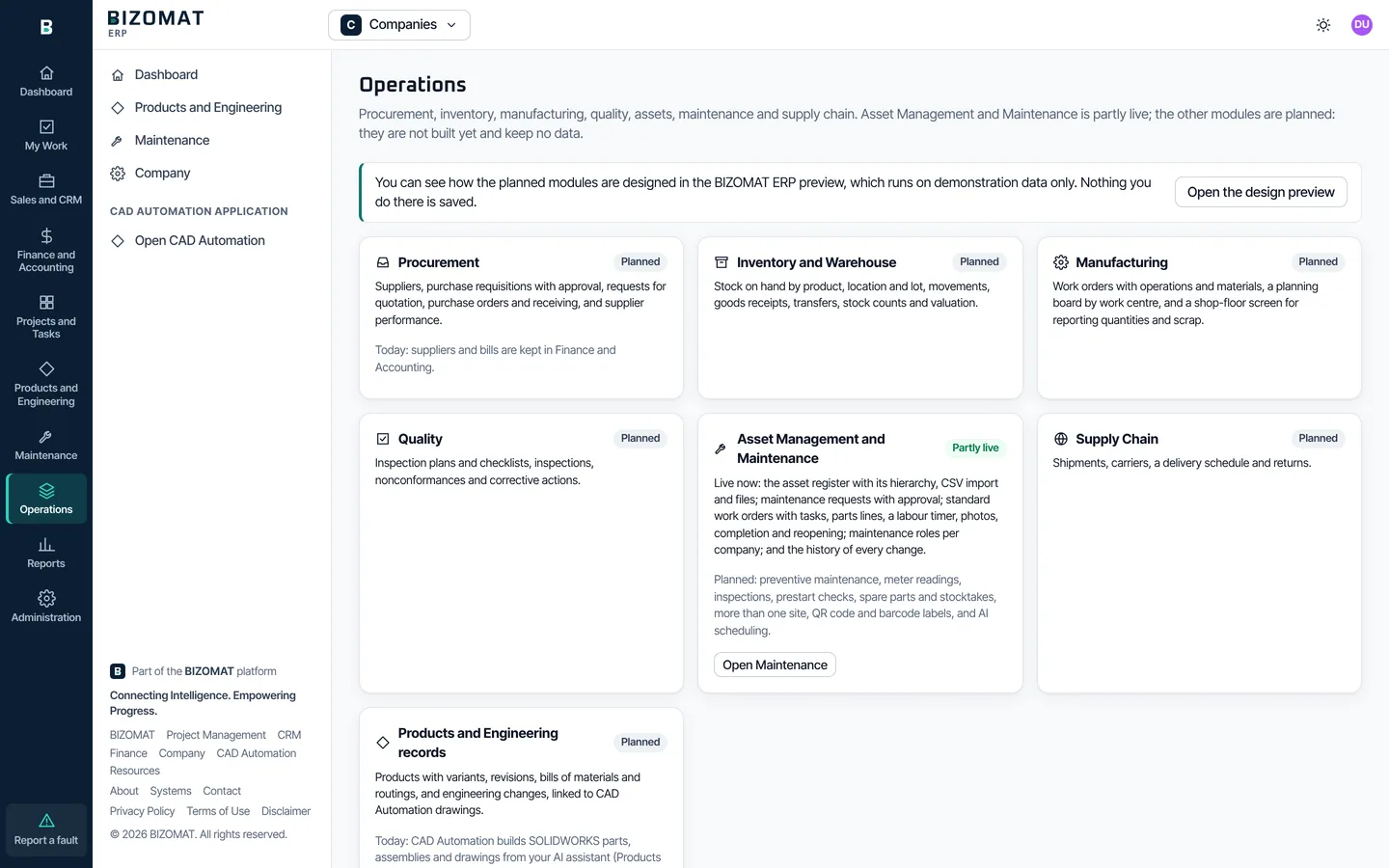
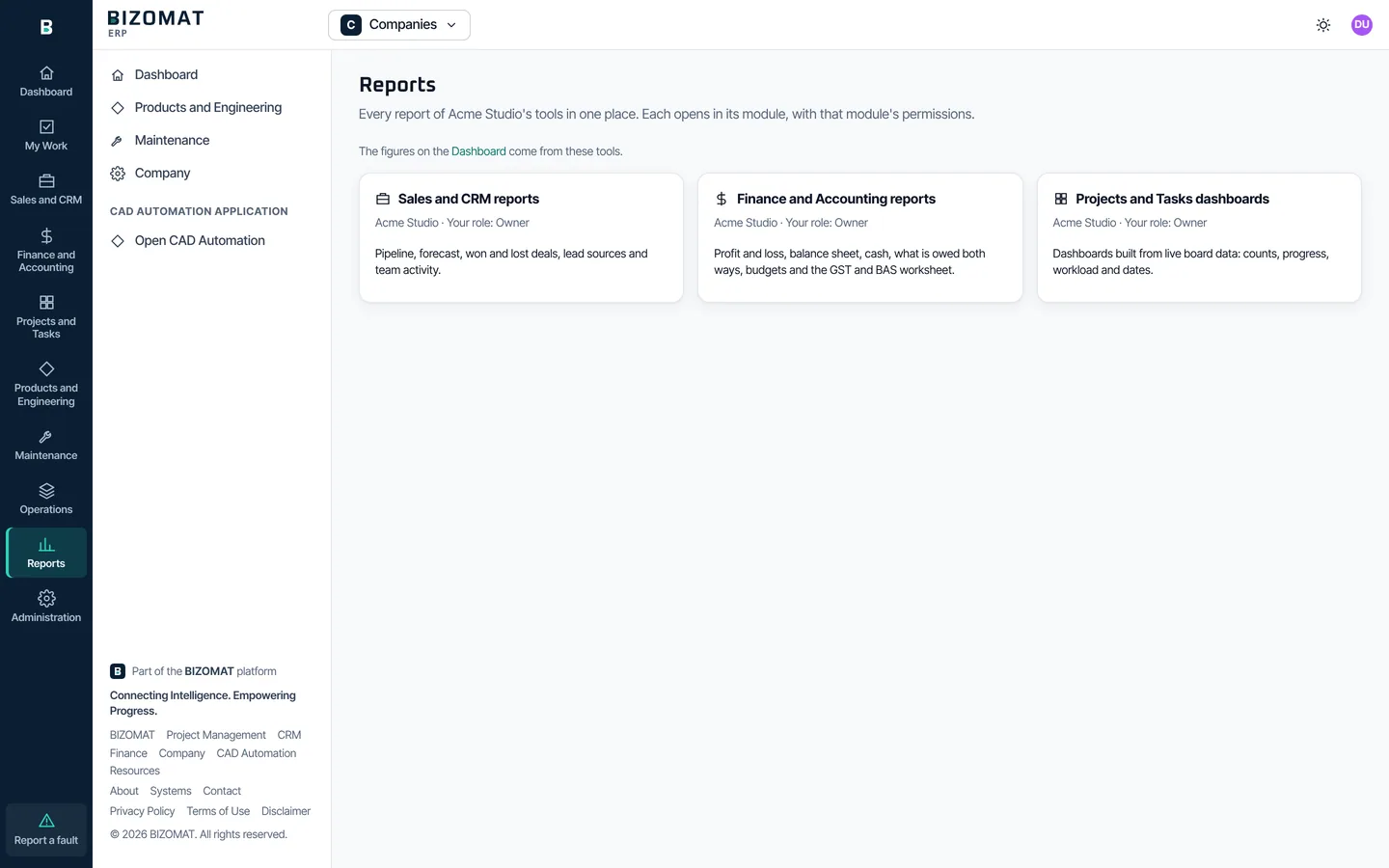
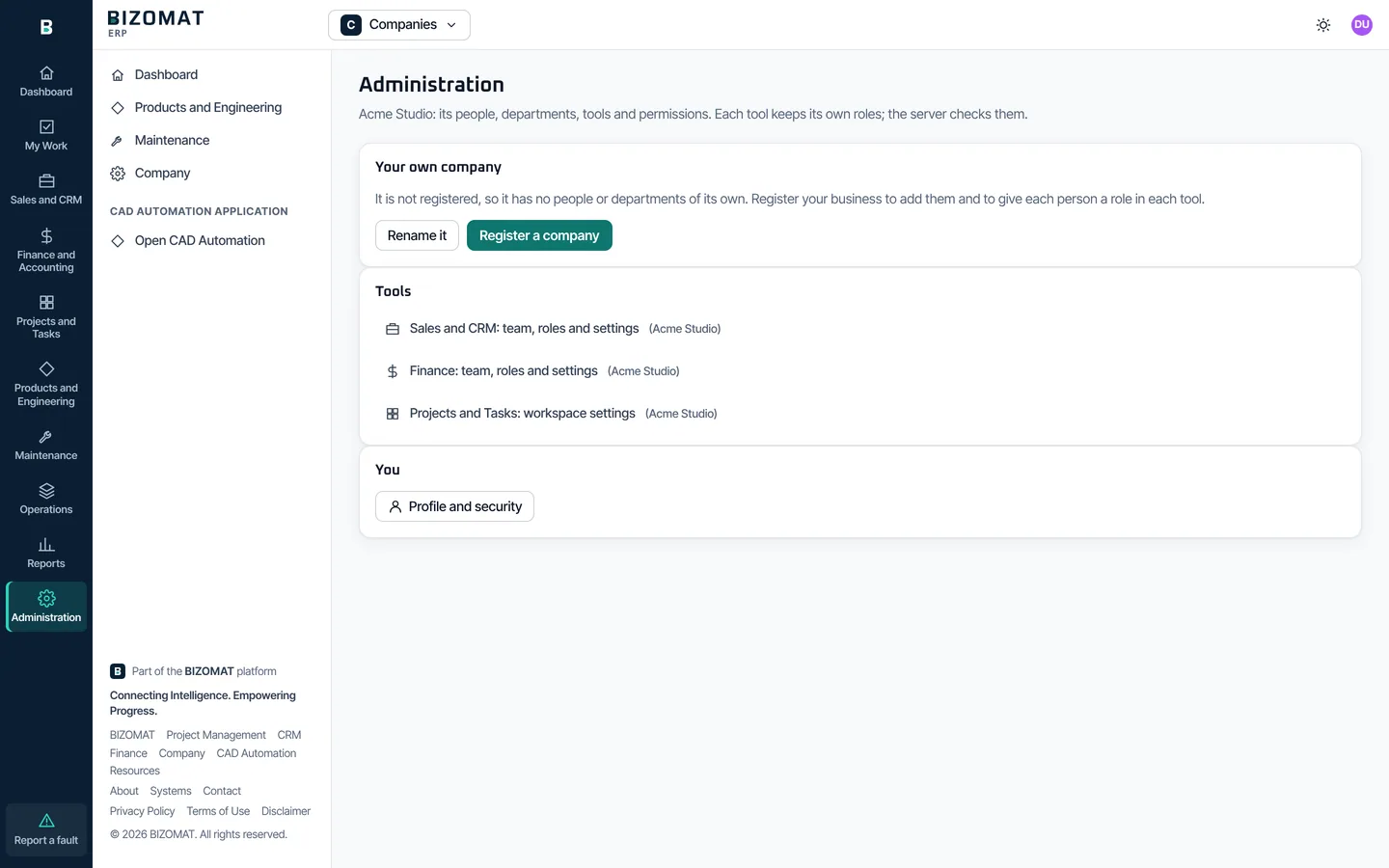
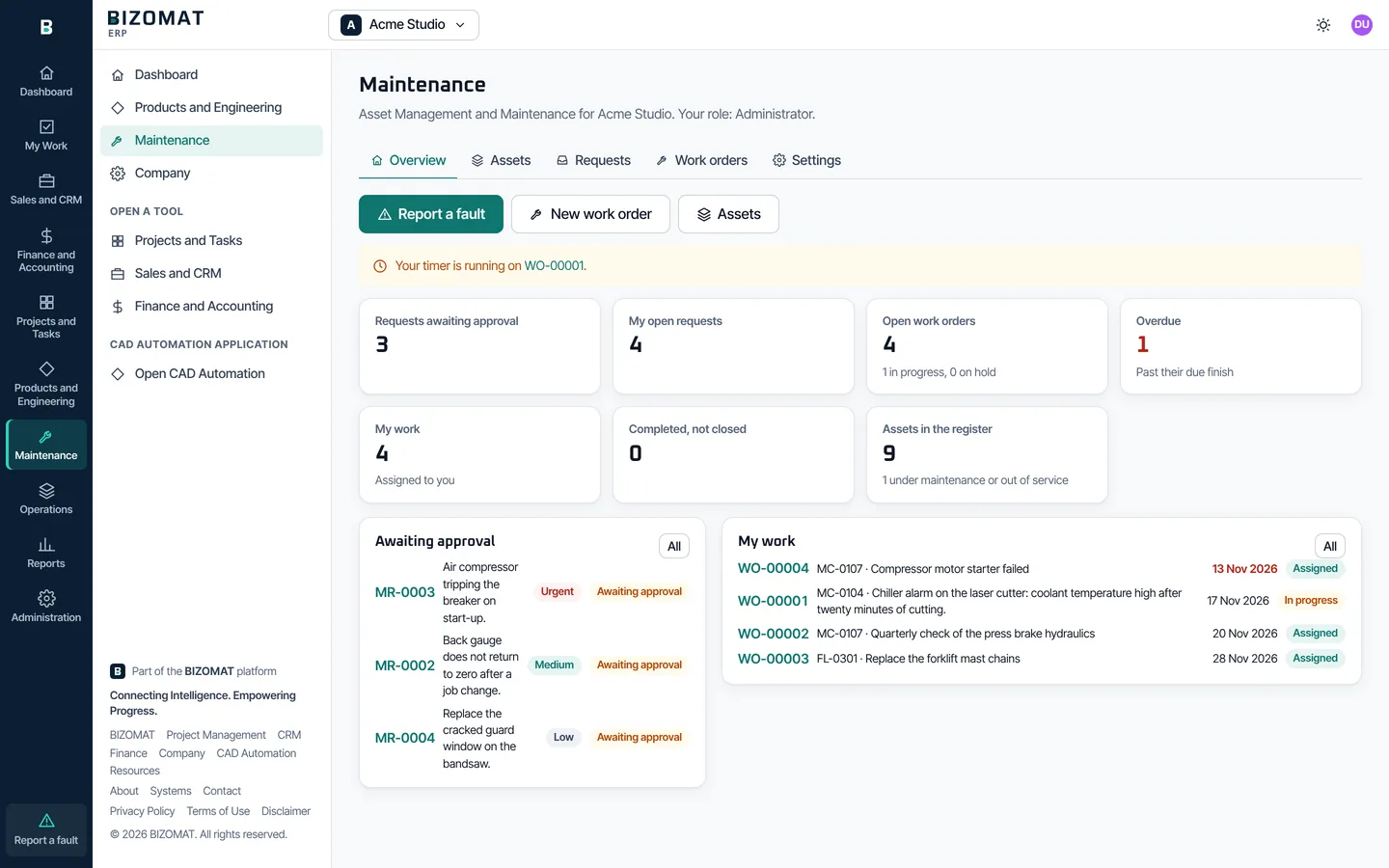
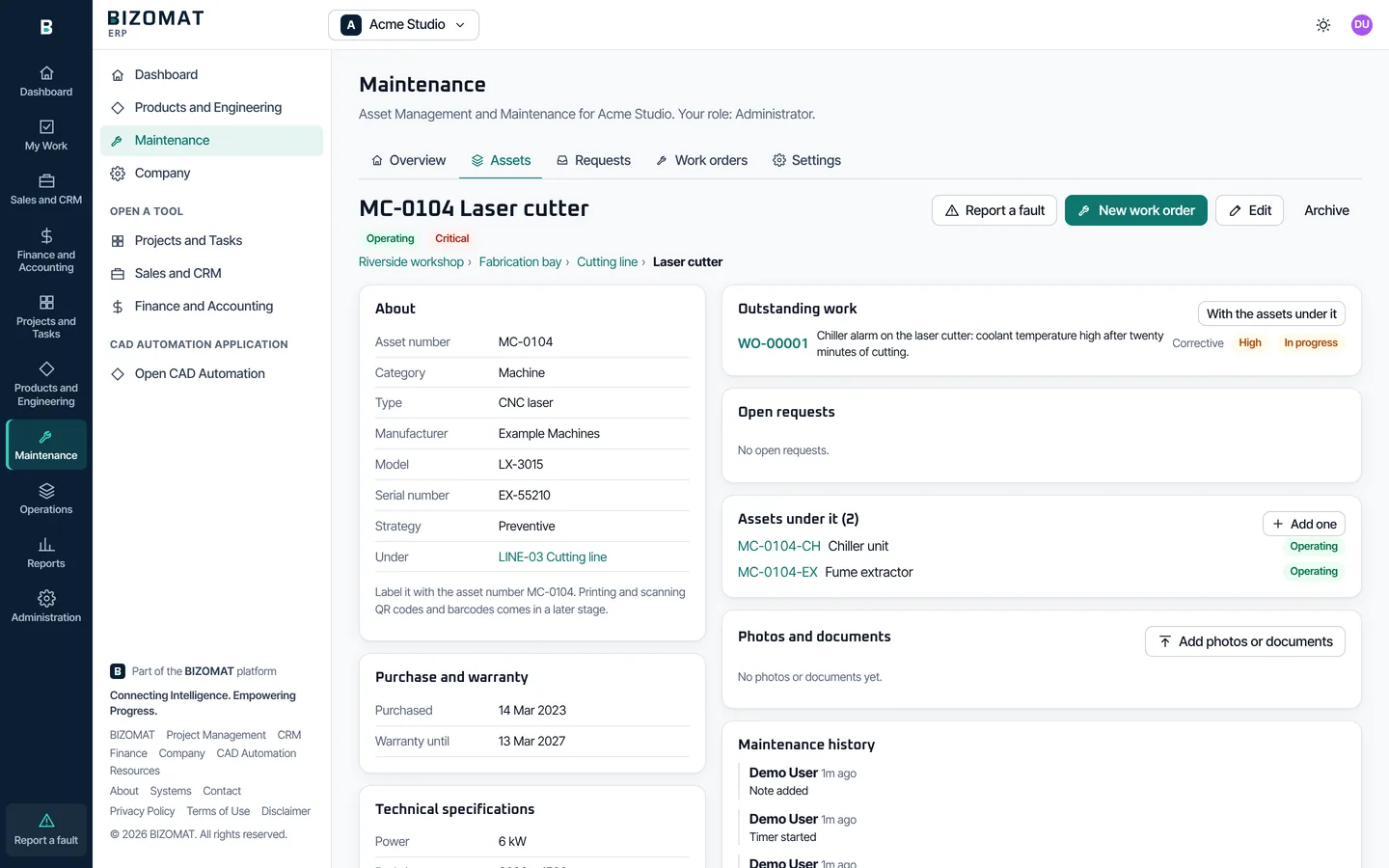
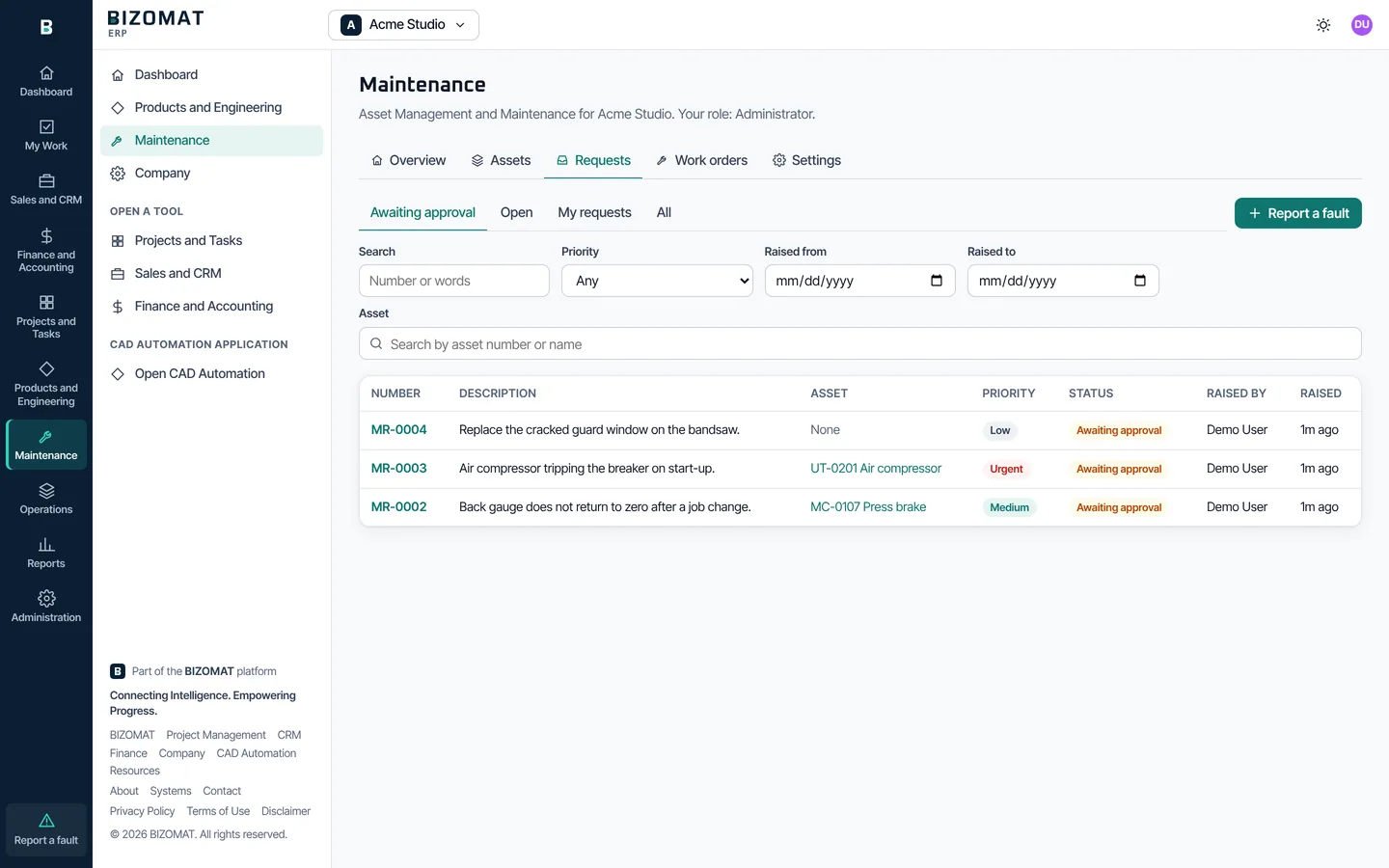
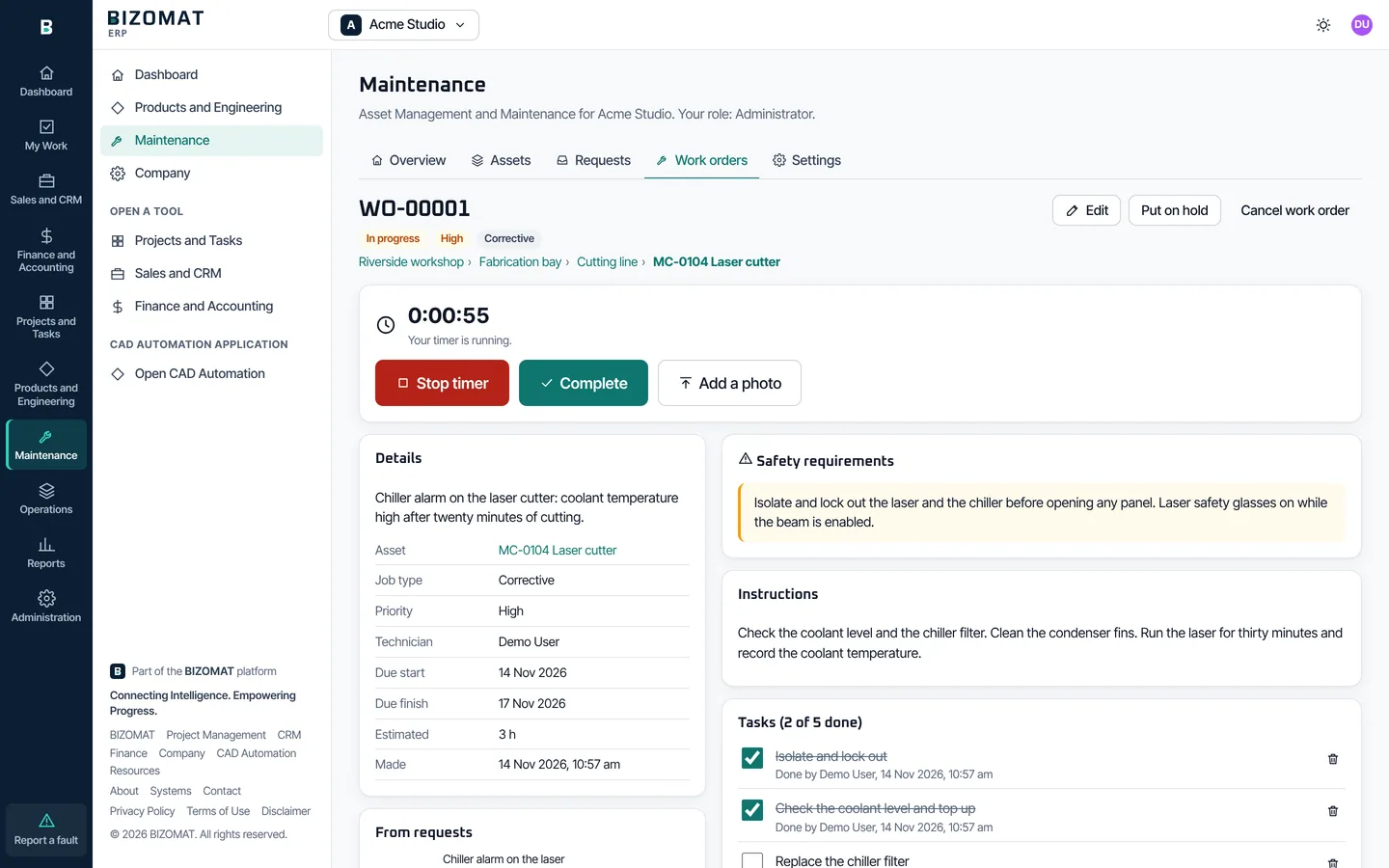
Captured from the running application with a fictional company and example data. The Operations screen lists the planned modules, each labelled Planned, beside what of Maintenance works today.
Screen by screen
The modules, one by one
The rail is at the left of every screen inside the ERP, and along the bottom on a phone. Each module keeps its own menu beside it.
Dashboard Connected
Opens on the company you used last. See its tools and figures, and open any of them.
My Work Live
Opens My Work in Projects and Tasks, for the workspace you used last: everything assigned to you.
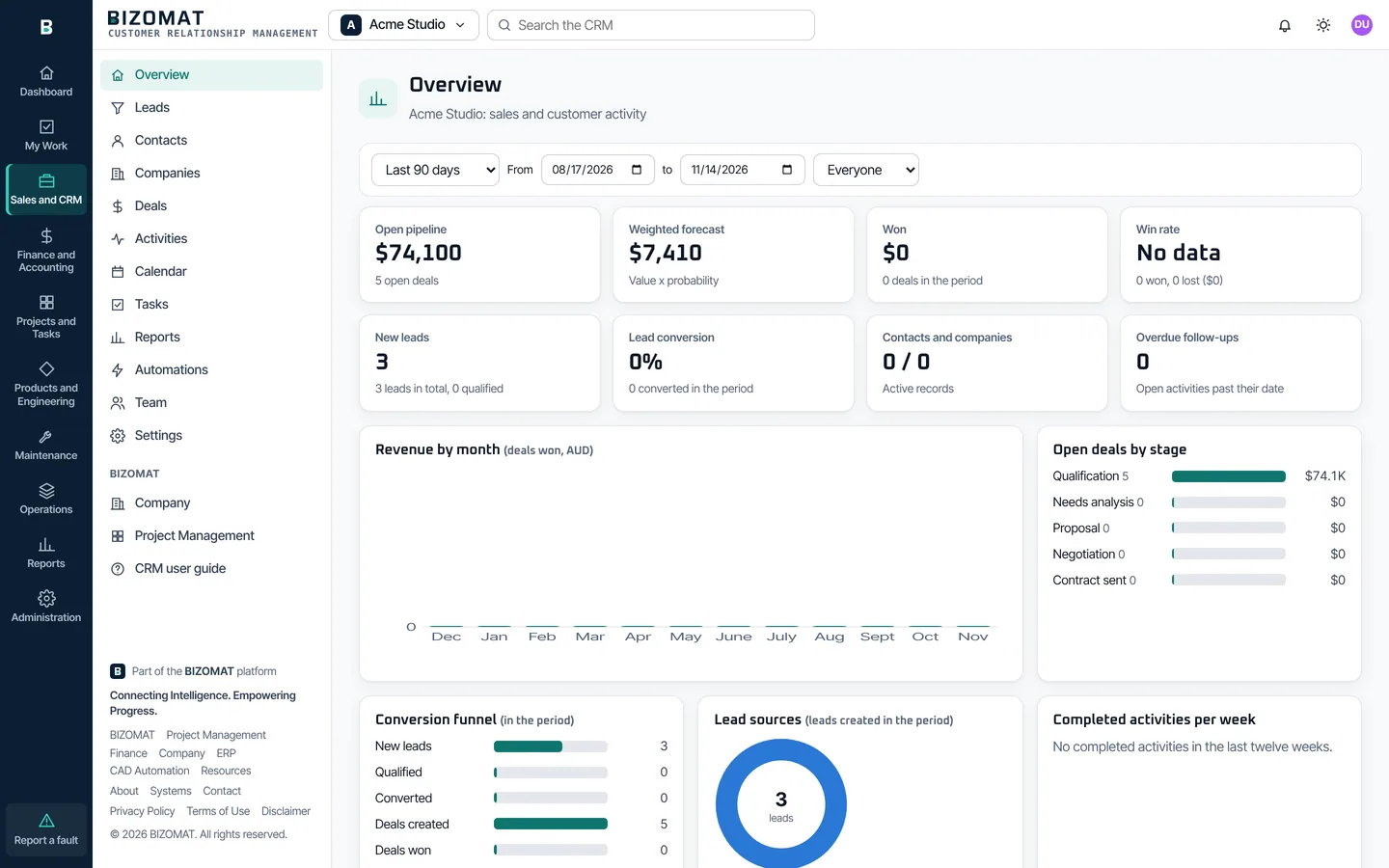
Sales and CRM Live
The CRM, inside the ERP: the same records, roles and settings. When the company runs Finance or Projects too, a deal shows what it is linked to there.
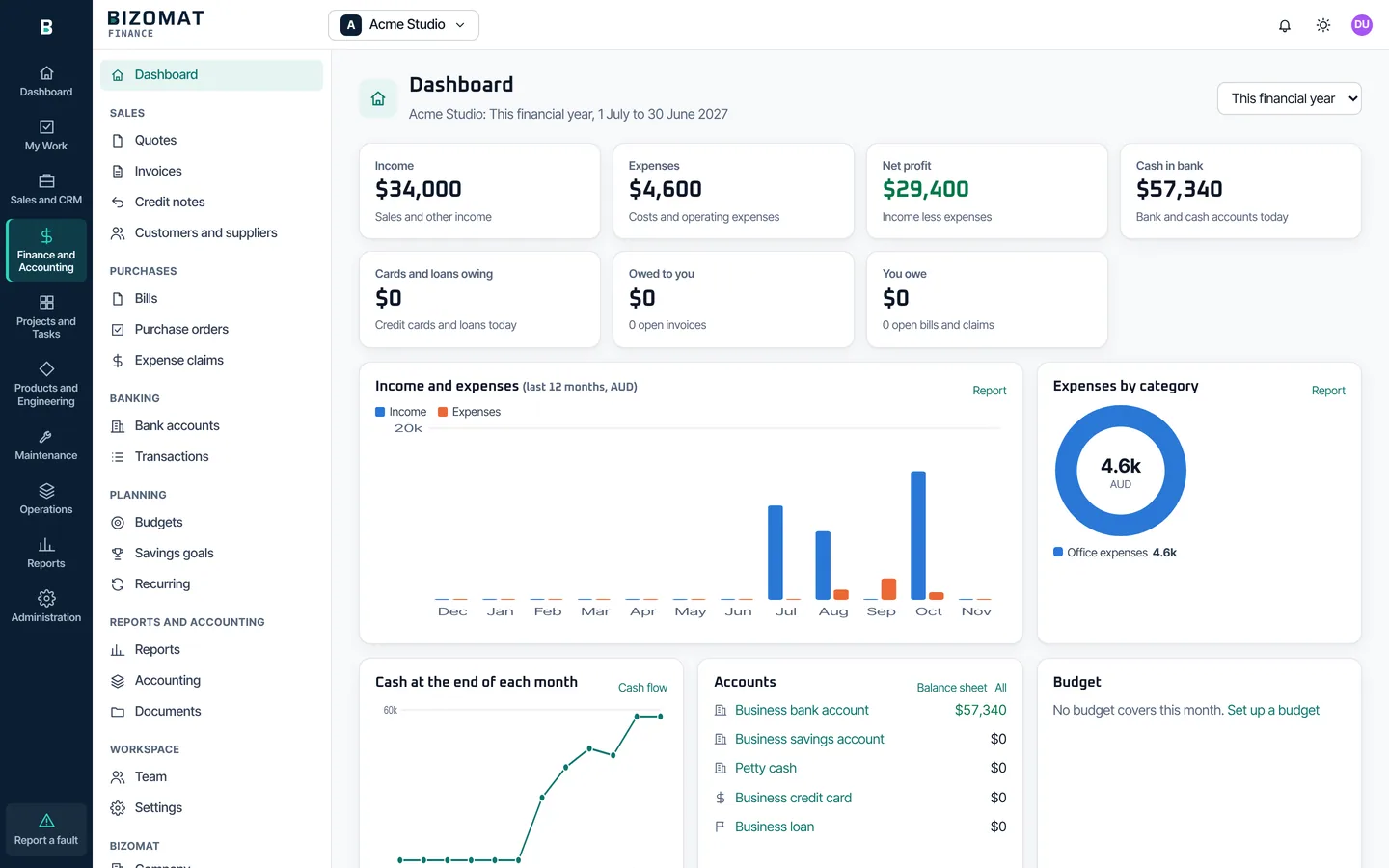
Finance and Accounting Live
Finance, inside the ERP, in the company's business workspace: transactions, quotes, invoices, bills, banking, budgets and reports.
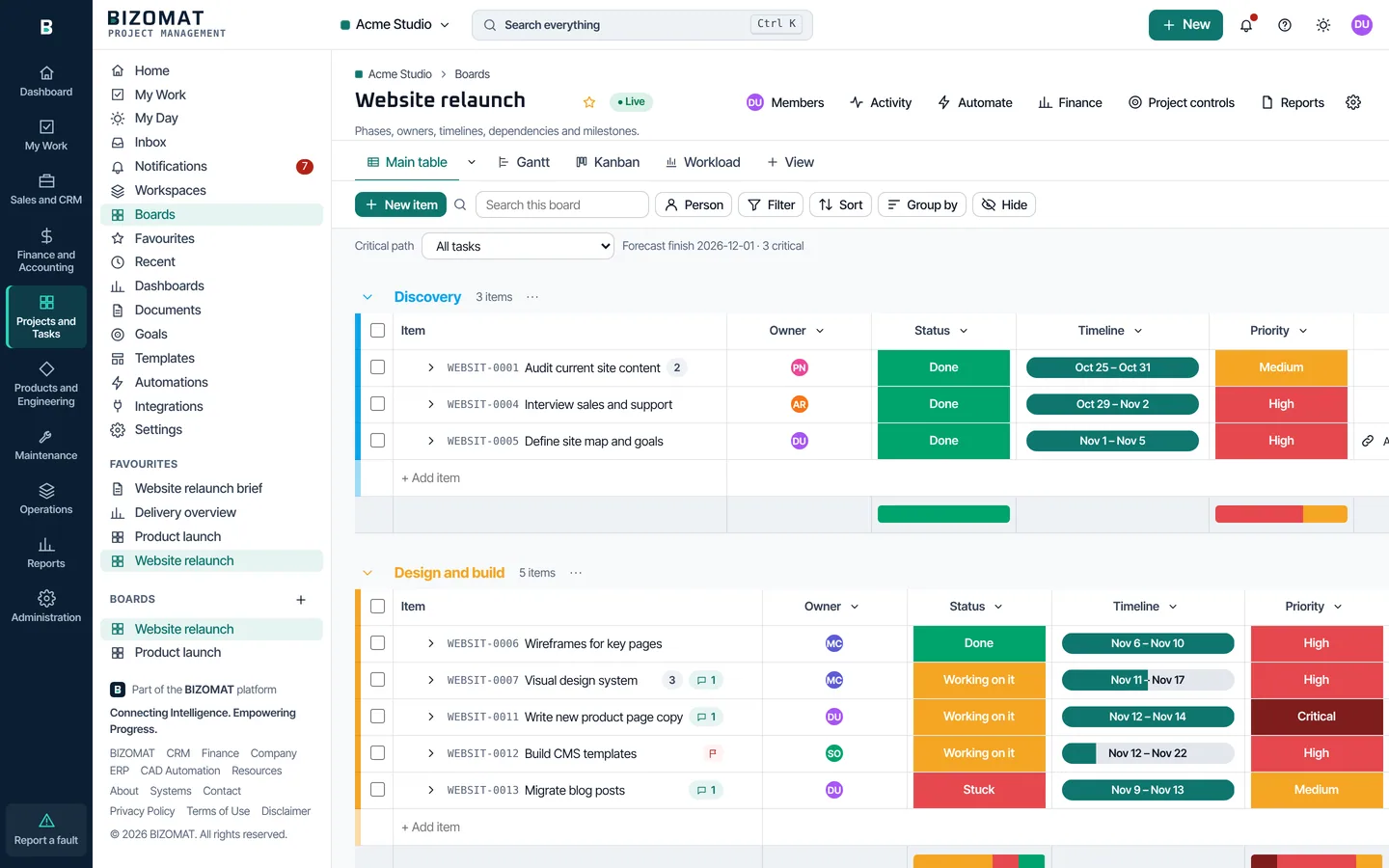
Projects and Tasks Live
Project Management, inside the ERP: boards, views, documents, dashboards and automations.
Products and Engineering Live
Products, Changes, Documents and CAD Automation. A product opens on its details, bill of materials (structure, every level, cost roll-up), revisions with comparison, where used, documents, suppliers and history. The CAD Automation tab has its set-up steps and the computers you may see; computers are listed once CAD Automation reports (in development).
Maintenance Live
Overview, Assets, Requests, Work orders and Settings for the company. Register assets in a hierarchy, raise and approve requests, make work orders, assign technicians and record the work. "Report a fault", at the foot of the rail, raises a request from any screen.
Operations Planned
The operations modules: Procurement (partly live: suppliers) and Products and Engineering records open from here, beside what of Maintenance works today; the rest are labelled Planned. Nothing planned works yet or keeps data.
Reports Live
A card for each tool's reports. Each opens in its module, with that module's permissions.
Administration Live
Company overview, people and roles, departments, tools and company settings; each tool's team and settings; your profile. Platform administrators also see the ERP console.
Getting started
Start in six steps
The user guide covers each step, and everything after it, screen by screen.
Open BIZOMAT ERP
Go to bizomat.ai/erp, or choose Sign in, then BIZOMAT ERP, at the top of any BIZOMAT page.
Sign in or create an account
Use your BIZOMAT email and password. New to BIZOMAT? Choose Create an account: your full name, work email and a password of at least 10 characters.
Choose or register a company
Your own company is ready. To work as a business, choose Register a company in the switcher: a business with its ABN, or yourself in your own name.
Set up departments
In Administration, open Departments, choose New department and pick its head. It appears in every tool.
Invite your people
In People, invite each person with a company role, a role in each tool and their departments.
Open a module
Choose Sales and CRM, Finance and Accounting or Projects and Tasks in the rail and add your first record.
Typical workflows
How work moves between the modules
Each step makes a record in the next tool only when you ask, and checks your role there.
Lead to deal to quote to invoice
Connected- Lead in the CRM
- Convert to a deal
- Start a quote
- Deal won
- Draft invoice in Finance
Convert a qualified lead into a contact, a company and a deal. On the deal, Start a quote makes a draft quote in Finance for the deal's company, to price in detail there; the customer can accept it online. When the deal is won, Make a draft invoice creates one line with the deal's title and value. It is a draft: check the amount, GST and account before approving.
Deal to project, with its costs
Connected- Deal in the CRM
- Start a project
- Tasks on the board
- Track in Finance
- Costs against budget
Start a project makes a board named after the deal in the company's Projects and Tasks. In the company area, give the project a Finance tracking project and a budget: income and costs posted to it show against the budget, all time and this financial year.
A company with departments and roles
Live- Register the company
- Add departments
- Invite people
- Roles in each tool
- One sign-in
Registering gives the company a Projects workspace, a CRM organisation and a Finance business workspace, or brings in ones you already own. Each invitation sets a company role, a role in each tool and departments. The person signs in once and sees what each role allows.
Integration with other systems
How the other systems fit in
BIZOMAT CRM
- Opens inside the ERP as Sales and CRM Live
- Deals start quotes, draft invoices and projects Connected
- A CRM company as a Finance customer Connected
BIZOMAT Finance
- Opens inside the ERP as Finance and Accounting Live
- Project costs and budgets Connected
- Departments in tracking Connected
BIZOMAT Projects
- Opens inside the ERP as Projects and Tasks Live
- My Work in the rail Live
- Projects from CRM deals, tasks from CRM activities Connected
BIZOMAT Engineering Automation
- Set-up steps in Products and Engineering Live
- The company's computers, reported by CAD Automation In development
- Sign in with your BIZOMAT account In development
BIZOMAT Manufacturing and Operations
- Maintenance: asset register, requests and work orders Live
- Procurement: the supplier master Live
- Purchase orders and receiving, inventory, production, quality and supply chain Planned
Resources (tools, the Library and guides) are not part of the ERP. They stay free and open to everyone, without signing in: see the Resources.
Questions
About BIZOMAT ERP
- What does BIZOMAT ERP manage?
- Your company and its tools: the dashboard, your assigned work, sales and customers (the CRM), finance and accounting, projects and tasks, products with their bills of materials, revisions, engineering changes and documents, suppliers, the set-up of CAD Automation, reports, and the company's people, departments and roles. Maintenance covers assets, requests and work orders; purchase orders and receiving in the ERP, inventory, manufacturing, quality and supply chain are planned and not built.
- Can it manage multiple companies?
- Yes. You can belong to several companies and switch between them with the company switcher. It lists your registered companies, your own company in your own name, and companies whose tools were shared with you. Each company keeps its own tools and records.
- Can different departments have separate permissions?
- Departments appear in every tool, but permissions are set for each person, not each department: every person has a role in each tool, set in the company area under People. A department's head can change who is in the department, and sees that department's figures in every tool.
- Does it connect with Finance and CRM?
- Yes. Both open inside the ERP. When the company runs both, a CRM deal can start a draft quote in Finance and become a draft invoice once won, and a CRM company can be linked to its Finance customer. Each link checks your role in both tools.
- Can it manage manufacturing?
- Not yet. Products, bills of materials, revisions, engineering changes and suppliers work today; manufacturing, production planning, inventory, purchase orders and receiving in the ERP, quality and supply chain are planned and not built. The Operations module lists them as Planned. Maintenance works today as its own module, for assets, requests and work orders; preventive maintenance is planned.
- Is my data copied into the ERP?
- No. The ERP shows each tool where it is. Nothing is copied or moved, and each tool keeps its own permissions.
- Who sees our CAD computers?
- In a registered company, the owner and administrators see the computers of everyone in it, and members see their own. Nobody sees another company's. The computers appear once CAD Automation reports to the ERP, which is in development; until then the page says so.
- What happened to the old tool addresses?
- bizomat.ai/tasks, /crm, /finance and /company forward into the ERP, so bookmarks and links in emails keep working.
Something not covered here? Contact BIZOMAT.
Open your company's workspace.
Sign in with your BIZOMAT account. Every module opens inside the ERP.