

BIZOMAT Systems
One connected platform to manage your business
Business software for small and medium businesses, manufacturers, workshops and engineering teams, in one catalogue. Sign in once to BIZOMAT ERP, choose your company, and open the CRM, Finance and Projects inside it. Engineering Automation drives SOLIDWORKS on your own computer.
Systems are software you sign in to. Resources (tools, the Library and guides) are separate: free and open to everyone, without signing in.
How the systems connect
One sign-in, one company, every tool
BIZOMAT ERP is the workspace. The CRM, Finance and Projects open inside it, each keeping its own records and permissions. Where your company runs more than one of them, they link: a deal starts a quote, becomes a draft invoice once it is won, and starts a project whose costs Finance tracks.
- Live
One sign-in
Your BIZOMAT account opens the ERP and every module in it. The old addresses of the tools forward there.
- Live
By company
Switch between your registered companies, your own company and the companies that shared a tool with you.
- Connected
Links between tools
Each tool keeps its own records and roles. A link makes a record in another tool only when you ask, and checks your role there.
What the labels mean
Every feature and module on this page carries one of these four labels.
- Live Works today in BIZOMAT.
- Connected Works today by linking two BIZOMAT systems, without copying records.
- In development Being built: parts exist, but it is not switched on for everyone yet.
- Planned Designed, not built. Not available today.
Business Management System
BIZOMAT ERP
Formerly BIZOMAT System
One workspace for your company: sales, finance, projects, engineering and administration, by company.
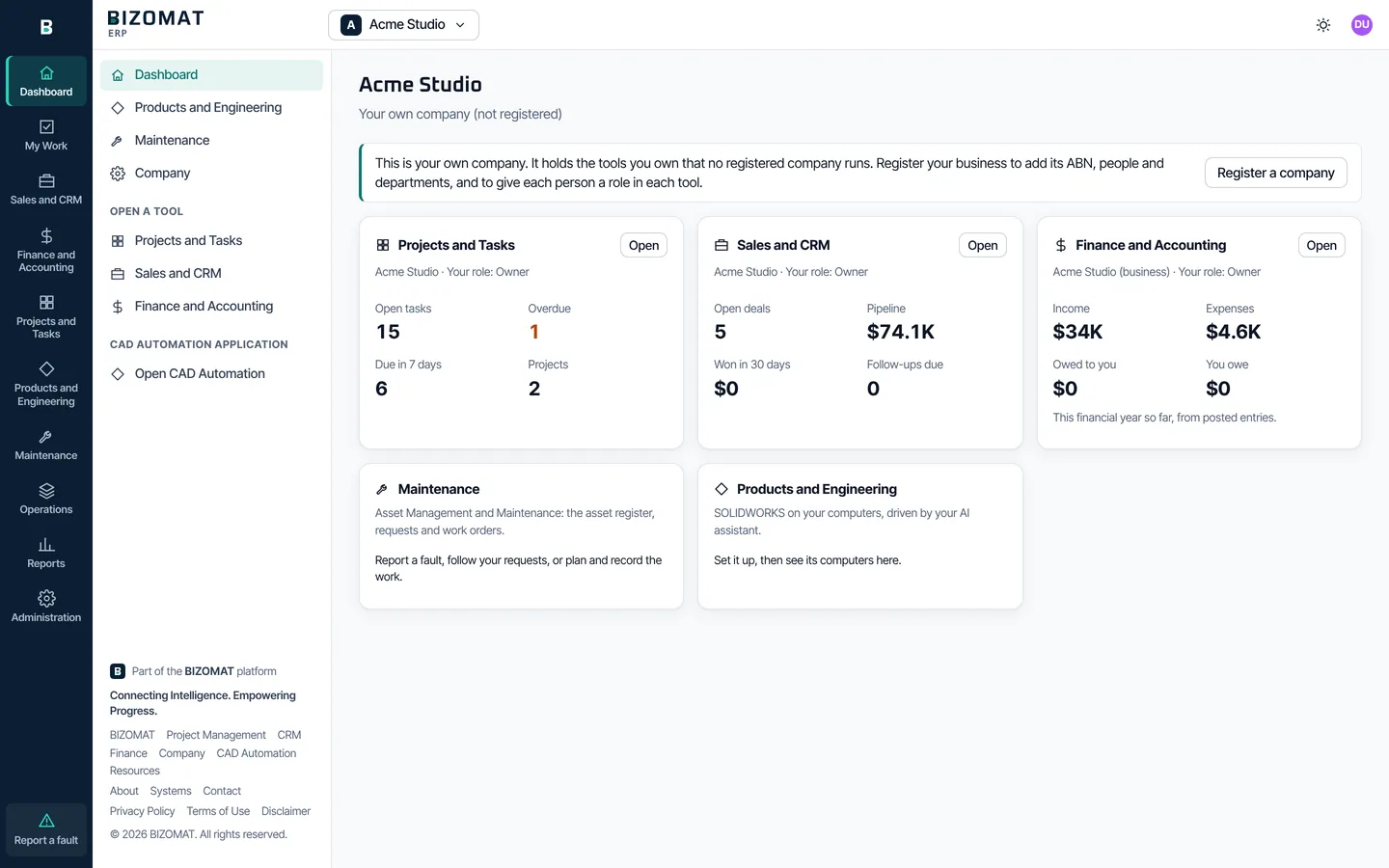
Working today: the workspace, the dashboard by company, Sales and CRM, Finance and Accounting, Projects and Tasks, Products and Engineering (products, bills of materials, revisions, engineering changes, documents and CAD Automation), Procurement's supplier master, Maintenance (assets, requests and work orders), Reports and Administration. Purchase orders and receiving in the ERP, inventory, manufacturing, quality and supply chain are planned.
BIZOMAT ERP is the workspace you sign in to. Choose a company at the top, then open any module from the rail at the left of every screen: the dashboard, your work, sales, finance, projects, engineering, reports and administration.
Who it is for
Owners and administrators who run sales, money and projects in one place, people who work in more than one tool, and anyone who works for more than one company.
Problems it solves
- A separate address and login for every tool.
- No single view of how the business is going across sales, money and projects.
- Giving each person the right access, tool by tool, as people join and leave.
- Mixing up the records of two businesses when you work for both.
Main capabilities
- One sign-in with your BIZOMAT account. Live
- A company switcher: your registered companies, your own company and the companies that shared tools with you. Live
- A dashboard of the company's tools, with the figures your role in each tool may see. Connected
- Sales and CRM, Finance and Accounting and Projects and Tasks, opened inside the ERP. Live
- Reports: every tool's reports in one place. Live
- Administration: company, people, departments, tool roles and settings. Live
Key benefits
- Move between tools without signing in again.
- Each tool keeps its own records and permissions. Nothing is copied between them.
- Departments are made once and appear in every tool.
- The old addresses (/tasks, /crm, /finance and /company) forward into the ERP, so bookmarks keep working.
How it connects
- The CRM, Finance and Projects open inside it as modules. Live
- Products and Engineering shows CAD Automation's set-up steps. Live
- Your company's CAD computers, reported by CAD Automation. Until it reports, the page says so. In development
- Maintenance: asset register, maintenance requests and work orders. Live
- Operations: procurement, inventory, manufacturing, quality and supply chain. Planned
Getting started
- Sign in. Open bizomat.ai/erp and sign in, or create a BIZOMAT account.
- Choose a company. Your own company is there already. Register your business to add its people and departments.
- Open a module. Choose Sales and CRM, Finance and Accounting or Projects and Tasks in the rail.
Questions
- Do I need a separate account for each tool?
- No. One BIZOMAT account opens the ERP and every tool inside it. Engineering Automation (CAD Automation) keeps its own sign-in for now.
- What is my own company?
- Everyone has one, in their own name. It is not registered, and it holds the tools you own outside a registered company.
Sign in with your BIZOMAT account. Every module opens inside the ERP.
Customer Management System
BIZOMAT CRM
Formerly BIZOMAT Customer Relationship Management
Customers, contacts, leads, deals and follow-ups, shared with your team.
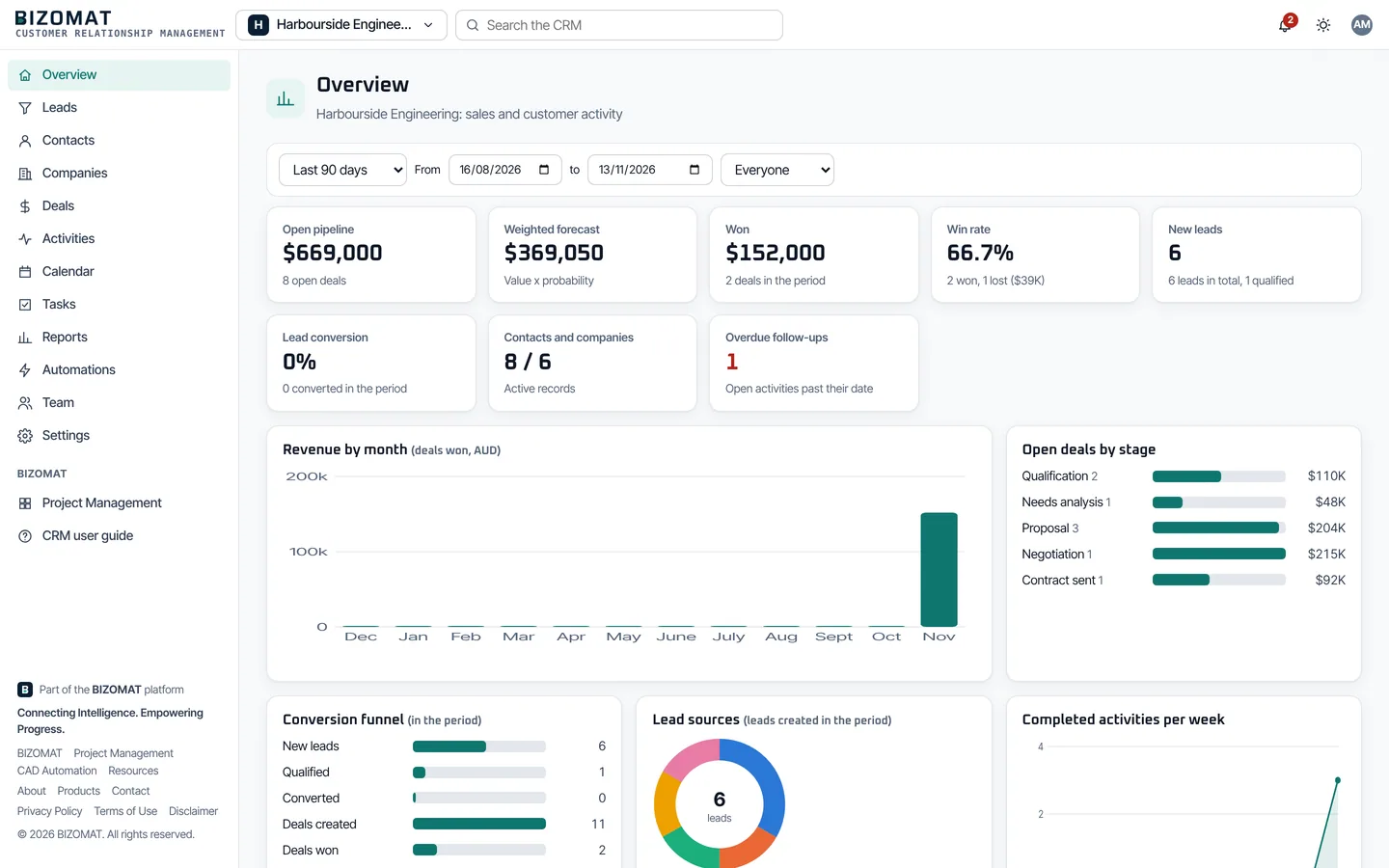
BIZOMAT Customer Relationship Management (CRM) keeps your contacts, companies, leads, deals and follow-ups in one shared place. Work your pipeline on a board, plan every activity and see what is closing from live reports.
Who it is for
Sales teams, owners who do their own selling, account managers, and anyone who follows up enquiries.
Problems it solves
- Enquiries that sit in an inbox and are forgotten.
- No shared history of what was said and agreed with a customer.
- Follow-ups that slip when someone is away.
- No clear view of what is likely to close.
Main capabilities
- Contacts and companies, with a warning before you add a duplicate. Live
- Leads with statuses, a lead score that explains itself, and conversion in one step. Live
- Pipelines you drag deals across, with Won and Lost. Live
- Activities and follow-ups on lists, a calendar and your own calendar app. Live
- A dashboard and 11 reports with CSV export. Live
- 7 ready-made automations, and your own. Live
Key benefits
- Anyone on the team can pick up where a colleague left off.
- 6 roles decide who may view, create, edit, delete, import and export.
- Contacts, companies and leads come in from a CSV file.
- Emails are logged from your own mail program. BIZOMAT does not read your mailbox.
How it connects
- When your company runs Finance too, a deal can start a draft quote there, and becomes a draft invoice once it is won. Connected
- A deal can start a project in Projects, and an activity can become a project task. Connected
- A CRM company can be linked to its customer record in Finance, so its open invoices show in the CRM to people whose Finance role sees sales. Connected
- Your company's departments appear as CRM teams. Connected
Getting started
- Open Sales and CRM. Sign in to BIZOMAT ERP and choose Sales and CRM in the rail.
- Use your organisation. Your company's CRM organisation is ready, or create one with a name and a currency.
- Add customers and deals. Add contacts, companies and leads, or import a CSV file, then work deals on the board.
Questions
- Does the CRM send emails to my customers?
- No. You send them from your own mail program and the CRM logs them. Gmail and Microsoft 365 synchronisation is not available yet.
- Can I bring my data from another CRM?
- Yes, for contacts, companies and leads: export them from the other system as a CSV file and use Import. Deals and activities are added in the CRM itself.
Finance Management System
BIZOMAT Finance
Accounts, transactions, quotes, invoices, bills, banking, GST and reports, on a double-entry ledger.
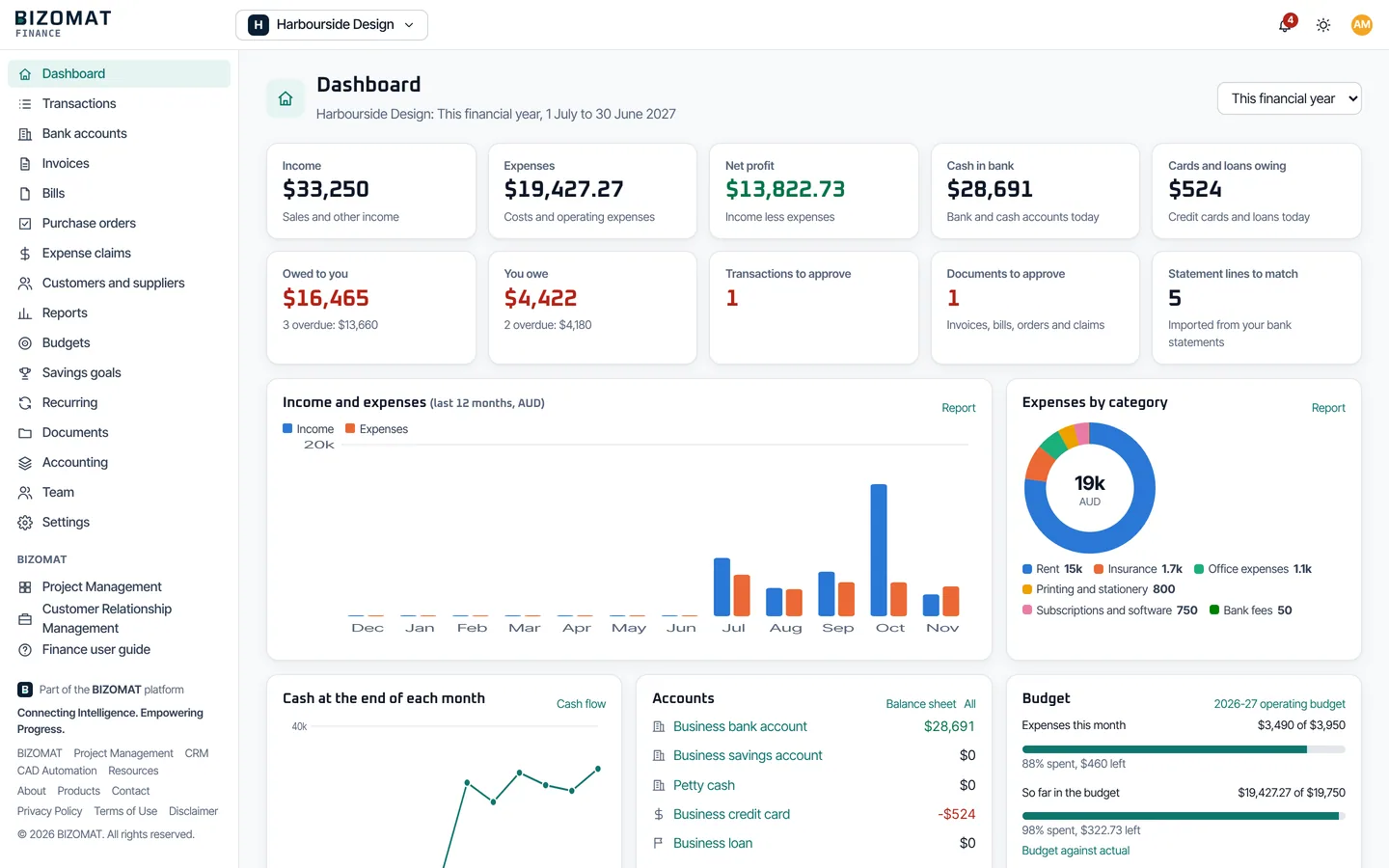
BIZOMAT Finance keeps your accounts, transactions, quotes, invoices, credit notes, bills, budgets and reports in one place, for personal, household and business money. Every entry is double-entry and balanced, with GST for Australian businesses.
Who it is for
Business owners, bookkeepers, accountants and finance managers. Also individuals and households, in personal and household workspaces.
Problems it solves
- Spreadsheets that do not balance, or that only one person understands.
- Invoices and bills that are hard to follow up.
- GST figures put together by hand each quarter.
- Not knowing what you are owed, and what you owe, today.
Main capabilities
- Personal, household and business workspaces. Live
- A double-entry ledger: posted entries are never edited, only reversed and posted again. Live
- Transactions, and bank statements imported from CSV, OFX and QIF files and reconciled. Live
- Quotes customers accept online, invoices, credit notes, bills, purchase orders and expense claims. Live
- 12 reports, from profit and loss and the balance sheet to a GST and BAS worksheet. Live
- Budgets, goals and alerts. Live
BIZOMAT Finance does not connect to banks and never asks for internet banking passwords: you import statements you download. It records payments; it does not make them. The GST report is a worksheet to check against your records before you lodge a BAS with the ATO; BIZOMAT does not lodge, and is not a certified tax, payroll or statutory accounting product.
Key benefits
- Every entry balances, so the reports agree with each other.
- Roles for accountants, finance managers and contributors, with approvals where you want them.
- A locked period refuses anything dated inside it.
- CSV and PDF for every report.
How it connects
- Quotes and draft invoices can start from CRM deals. Connected
- A Finance customer can be linked to its CRM company. Connected
- A project can be tracked in Finance, so its income and costs show against a budget. Connected
- Your company's departments appear in Finance's tracking. Connected
Getting started
- Open Finance and Accounting. Sign in to BIZOMAT ERP and choose Finance and Accounting in the rail.
- Choose a workspace. Your company's business workspace, or a personal or household workspace of your own.
- Record your money. Import a bank statement, record transactions and create your first invoice.
Questions
- Does Finance connect to my bank?
- No, and it never asks for internet banking passwords. Download statements from your bank and import them as CSV, OFX and QIF files.
- Does it lodge my BAS with the ATO?
- No. The GST and BAS report is a worksheet to check against your records before you lodge. BIZOMAT is not a certified tax, payroll or statutory accounting product.
Opens inside BIZOMAT ERP, in the Finance and Accounting module.
Project Management System
BIZOMAT Projects
Formerly BIZOMAT Project Management
Projects, tasks, teams, timelines and documents in one shared workspace.
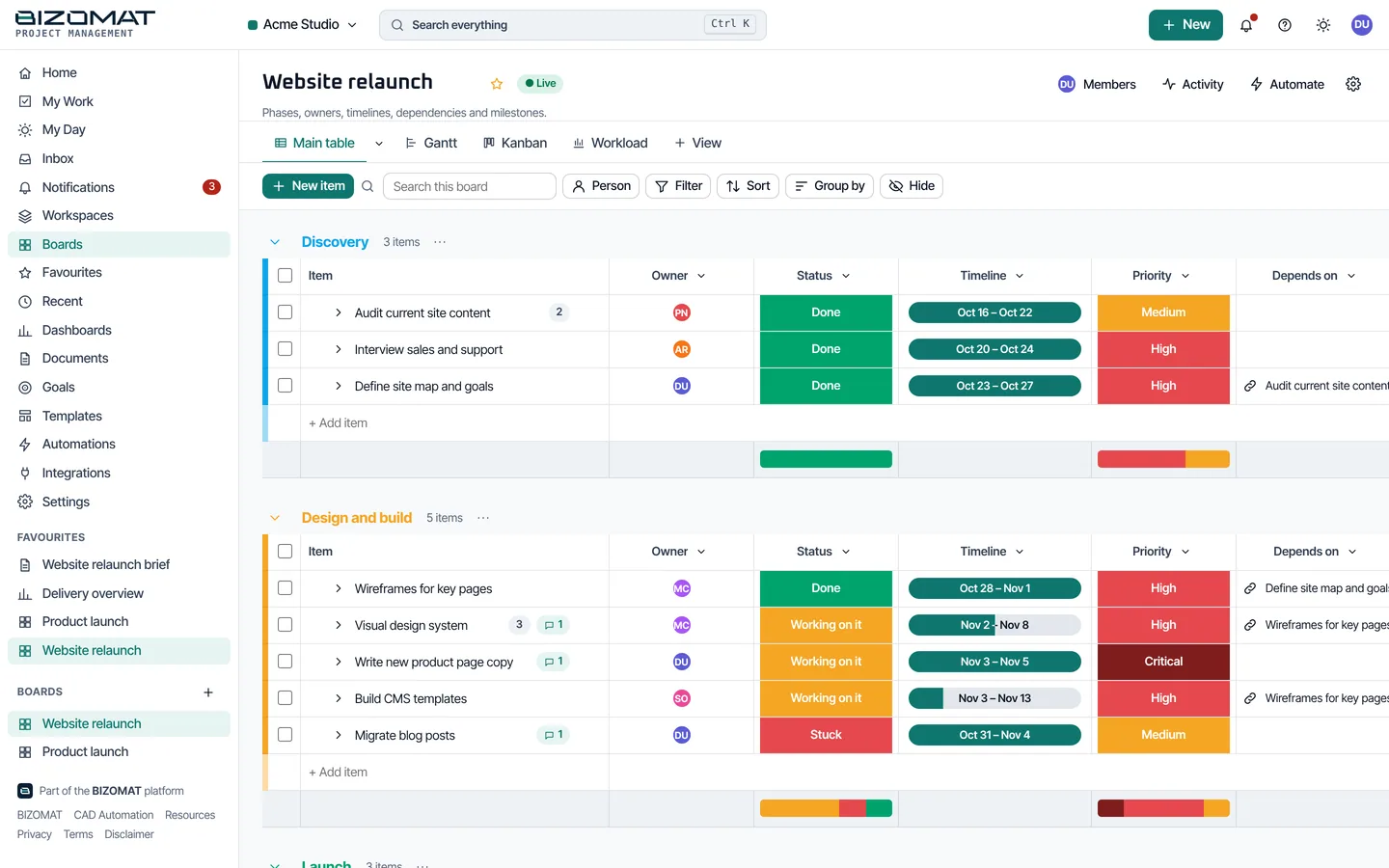
BIZOMAT Projects brings your projects, tasks, documents and dashboards into one place. Plan the work, assign it, track progress and automate the routine steps.
Who it is for
Project teams and managers, operations and office teams, and anyone who shares work with colleagues.
Problems it solves
- Work tracked in emails, chats and spreadsheets.
- Tasks without a clear owner or due date.
- Status meetings held only to find out where things are.
- Documents kept apart from the work they describe.
Main capabilities
- Boards with groups, items, subitems and 25 column types. Live
- 9 views of the same work, from a table and a Kanban board to a Gantt timeline. Live
- Updates with @mentions, attachments, time tracking and linked documents. Live
- Automations with run logs. Live
- Dashboards with 11 widget types, documents and goals. Live
- My Work: everything assigned to you, in one list. Live
Key benefits
- Everyone works from the same plan, in the view that suits them.
- Workspace roles from owner to viewer, and private or shared boards.
- Templates to start a new project quickly.
- Signed outgoing webhooks, and incoming webhooks for Slack and Microsoft Teams.
How it connects
- A CRM deal can start a project, and a CRM activity can become a task. Connected
- A project can be tracked in Finance, so its income and costs show against a budget. Connected
- Your company's departments appear as teams. Connected
- My Work in BIZOMAT ERP opens what is assigned to you here. Live
Getting started
- Open Projects and Tasks. Sign in to BIZOMAT ERP and choose Projects and Tasks in the rail.
- Create a board. Start from a template or an empty board, then add groups and items.
- Assign and track. Give each item an owner, a status and a date, and switch views as you need.
Questions
- Which views are there?
- Table, Kanban, Calendar, Timeline and Gantt, Chart, Workload, Form, Map and Files, all showing the same items.
- Who can see my boards?
- People in the workspace, as their role allows. A private board is seen only by the people added to it and the workspace's owners and administrators.
Opens inside BIZOMAT ERP, in the Projects and Tasks module.
Engineering Automation System
BIZOMAT Engineering Automation
Formerly CAD Automation (CADOS)
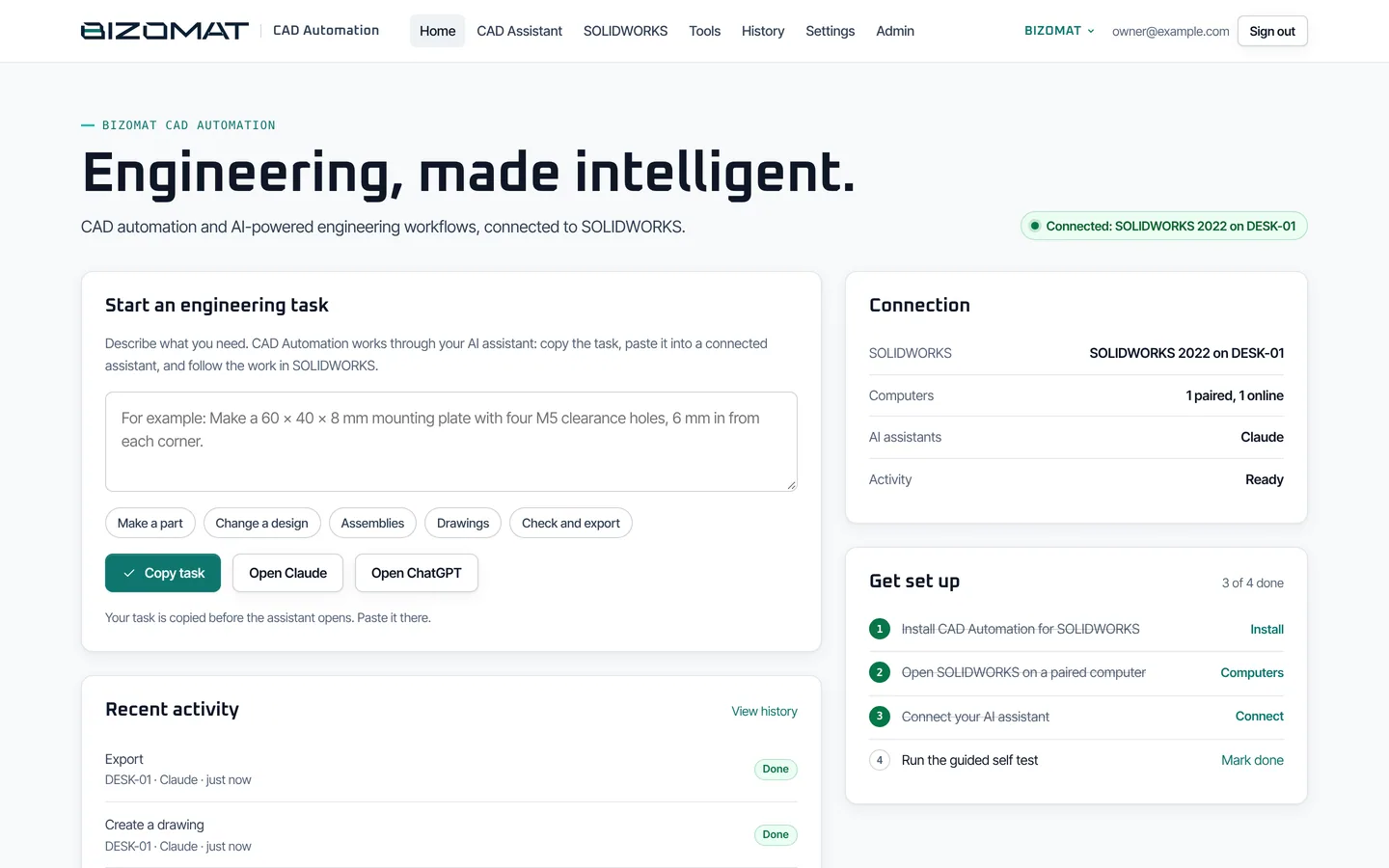
Your AI assistant builds and checks SOLIDWORKS parts, assemblies and drawings on your own computer.
Needs SOLIDWORKS on your own Windows computer, the BIZOMAT add-in and Companion, and an AI assistant that supports MCP connectors. CAD Automation keeps its own sign-in for now.
Its application, CAD Automation, connects Claude, ChatGPT or another assistant that supports MCP connectors to SOLIDWORKS on your own Windows computer. You describe the part, the change or the check; it builds native, editable features in your own files.
Who it is for
Mechanical designers, engineers and drafters who use SOLIDWORKS on Windows, alone or in a small team.
Problems it solves
- Repetitive modelling of parts that differ only in size.
- Drawings that take a long time to set out.
- Checking sizes, volumes and interference by hand.
Main capabilities
- Parts: sketches, extrudes, revolves, holes, fillets, patterns and more. Live
- Assemblies: components, mates and interference checks. Live
- Drawings: native .SLDDRW files with views, dimensions and a bill of materials. Live
- Your existing parts and assemblies: read, measure and change them. Live
- Import STEP, IGES and Parasolid files; export STEP, STL, PDF, DWG and DXF. Live
- 31 tools your assistant can call. Live
Key benefits
- Everything it makes is a real SOLIDWORKS feature you can edit.
- Each feature is checked on a CAD kernel before SOLIDWORKS is touched.
- Deletions ask you to confirm on your computer.
- SOLIDWORKS saves your models on your computer, and the link to it is outgoing HTTPS only.
How it connects
- In BIZOMAT ERP, Products and Engineering shows CAD Automation's set-up steps. Live
- Your company's computers in the ERP, reported by CAD Automation: owners and administrators see the company's, members their own. Until it reports, the page says so and links to CAD Automation. In development
- Sign in with your BIZOMAT account. CAD Automation keeps its own sign-in for now. In development
- Product records with revisions and bills of materials, linked to CAD drawings. Planned
Getting started
- Sign in and install. Sign in to CAD Automation and download the installer: the SOLIDWORKS add-in and the Companion.
- Pair the computer. Sign in once from the Companion. The computer gets its own key.
- Connect your assistant. Add the connector address in Claude, ChatGPT or another MCP app, then ask in plain language.
Questions
- What do I need?
- SOLIDWORKS on your own Windows computer, the BIZOMAT add-in and Companion (one installer), and an AI assistant that supports MCP connectors.
- Does SOLIDWORKS run in the cloud?
- No. It runs on your own computer with your own licence. Commands reach it through the Companion, over a connection your computer makes.
- How far has it been tested?
- Automated tests cover every SOLIDWORKS tool through a simulated SOLIDWORKS and the real Windows Companion link against the real server. Field testing of the installed product on Windows with SOLIDWORKS 2022 is the next milestone.
CAD Automation has its own sign-in for now. Its setup and your company's computers are also in BIZOMAT ERP, under Products and Engineering.
Manufacturing and Operations System
BIZOMAT Manufacturing and Operations
Procurement, inventory, manufacturing, quality, maintenance and supply chain, as ERP modules.
Planned, not built, except the first stage of Maintenance (assets, requests and work orders) and Procurement's supplier master, which work today inside BIZOMAT ERP.
A family of BIZOMAT ERP modules for buying, storing, making, checking, maintaining and shipping goods. Maintenance works today inside BIZOMAT ERP; the other modules are planned and cannot be used or bought yet.
Who it is for
It is designed for manufacturers, workshops and businesses that buy, store and ship goods.
Problems it is designed to solve
- Stock levels known only by counting.
- Purchases, deliveries and bills that do not match.
- Production planned on whiteboards and spreadsheets.
- Quality and maintenance records kept on paper.
Modules and their status
- Procurement Planned
- Inventory and warehouse Planned
- Manufacturing and production planning Planned
- Quality Planned
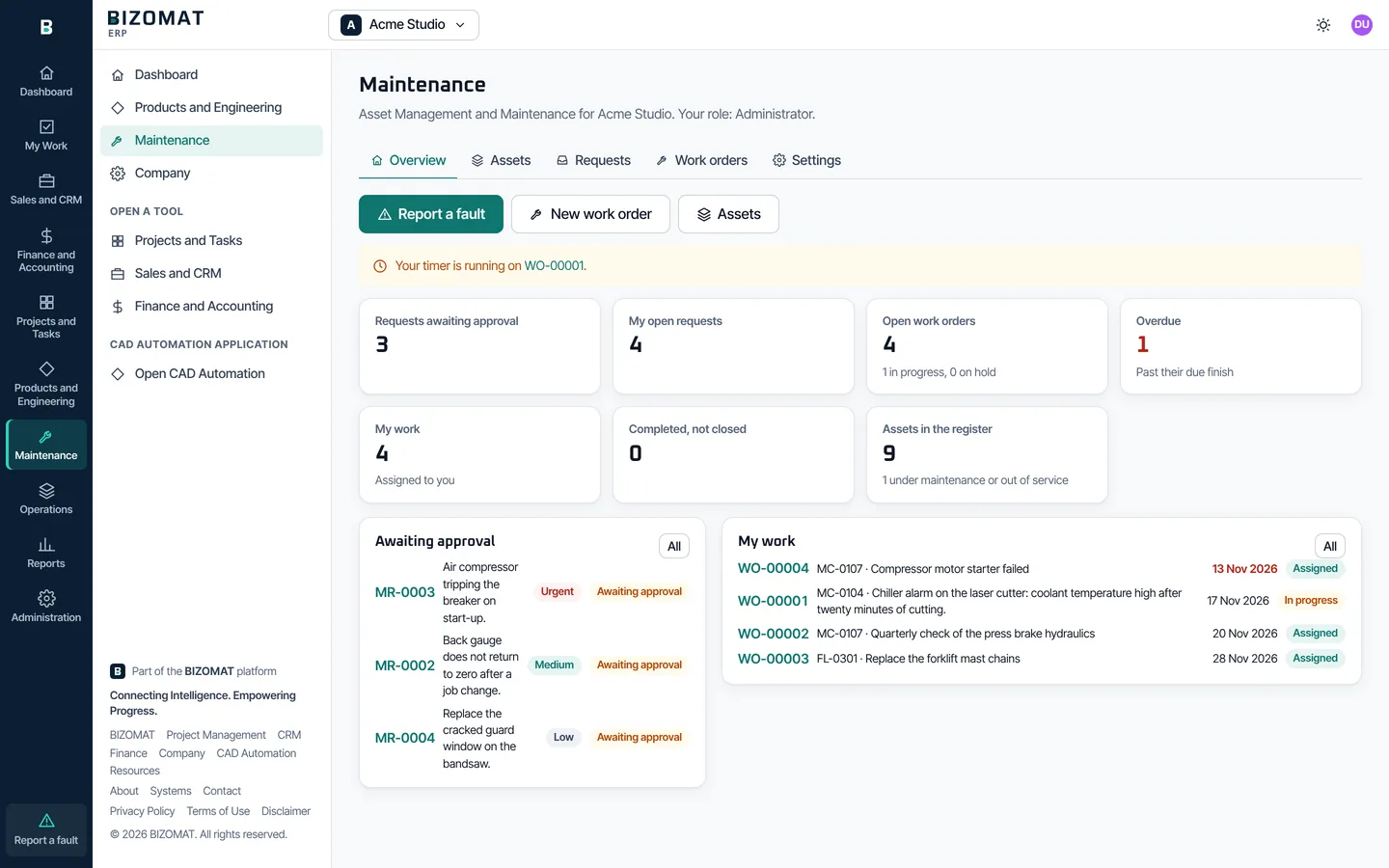
- Maintenance, first stage, in BIZOMAT ERP: asset register, requests with approval, work orders, technicians, labour timer, photos and documents Live
- Preventive maintenance, inspections, spare parts and reliability reporting Planned
- Supply chain Planned
What it is designed to do
- Purchase orders, receipts and supplier bills that match. Planned
- Stock on hand by product and location, kept by its movements. Planned
- Work orders planned against the capacity of each work centre. Planned
- Inspections and nonconformances on record. Planned
How it is designed to connect
- Designed to work through Finance: purchase orders, bills and stock values. Planned
- Designed to put the work of each operation on a Projects board. Planned
- Designed to turn accepted quotes and won deals into sales orders. Planned
What you can do today
- Suppliers and bills. Keep suppliers, purchase orders and bills in Finance today.
- Plan the work. Plan production work and tasks on a board in Projects.
- Look after your assets. Use Maintenance in BIZOMAT ERP for your asset register, maintenance requests and work orders.
Questions
- Can I use it today?
- Maintenance, yes: it works inside BIZOMAT ERP. The other modules are planned and not built; there is nothing to sign up for or buy.
- When will the other modules be ready?
- There is no date yet. Each module is labelled Planned until it is built and tested, and only then is it called Live.
Not available yet: there is no application to open.
Compare
The systems side by side
What each system manages, whether it works today, where it opens and which account signs in.
| System | What it manages | Status | Where it opens | Who signs in |
|---|---|---|---|---|
| BIZOMAT ERP Business Management System | Your company: its tools, dashboard, reports, people, departments and roles | Available, some modules planned | bizomat.ai/erp | Your BIZOMAT account |
| BIZOMAT CRM Customer Management System | Customers, contacts, leads, deals, activities and follow-ups | Available | Inside BIZOMAT ERP, in Sales and CRM | Your BIZOMAT account |
| BIZOMAT Finance Finance Management System | Accounts, transactions, quotes, invoices, bills, budgets, reports and a GST worksheet | Available | Inside BIZOMAT ERP, in Finance and Accounting | Your BIZOMAT account |
| BIZOMAT Projects Project Management System | Projects, tasks, timelines, documents and dashboards | Available | Inside BIZOMAT ERP, in Projects and Tasks | Your BIZOMAT account |
| BIZOMAT Engineering Automation Engineering Automation System | SOLIDWORKS parts, assemblies and drawings, through your AI assistant | Available | Its own application, CAD Automation, at bizomat.ai/cad. Set-up and computers also show in the ERP. | A CAD Automation account, for now |
| BIZOMAT Manufacturing and Operations Manufacturing and Operations System | Procurement, inventory, production, quality, maintenance and supply chain | Planned | Maintenance opens inside BIZOMAT ERP. The other modules are not available yet. | Nobody yet: not available |
Available, some modules planned: BIZOMAT ERP works today, and its Operations modules are planned. Resources are not in this table: they are not a system, and they are free.
Getting started
Start in four steps
The BIZOMAT ERP user guide walks through each step, screen by screen.
Create your BIZOMAT account
Open BIZOMAT ERP and choose Create an account: your full name, work email and a password.
Register your company
Register your business with its ABN, or yourself in your own name. It gets a Projects workspace, a CRM organisation and a Finance business workspace, or brings in ones you already own.
Invite your people
Invite each person with a company role, a role in each tool and their departments.
Work from the rail
Open Sales and CRM, Finance and Accounting or Projects and Tasks. Set up Engineering Automation from Products and Engineering.
Questions
About the platform
- What is the difference between Systems and Resources?
- Systems are BIZOMAT's business software: you sign in to use them. Resources are free learning materials (calculators, the Library and guides), open to every visitor without signing in. Resources are not part of any system, and they stay free.
- Do I need a separate account for each system?
- No. One BIZOMAT account opens BIZOMAT ERP, and the CRM, Finance and Projects open inside it. Engineering Automation (the CAD Automation application) keeps its own sign-in for now.
- Can I manage more than one company?
- Yes. Register more than one company, or accept invitations from others, and move between them with the company switcher. Everyone also has their own company in their own name, which is not registered.
- Is my data copied between the systems?
- No. Each tool keeps its own records and permissions. A link between tools, such as a won deal to a draft invoice, makes a record in the other tool only when you ask, and checks your role there first.
- Does Finance connect to my bank or lodge my BAS?
- No. Finance does not connect to banks, make payments or lodge with the ATO. You import statements you download, and the GST and BAS report is a worksheet to check before you lodge yourself.
- Can BIZOMAT manage manufacturing or inventory?
- Not yet. Manufacturing and Operations (procurement, inventory, production, quality and supply chain) is planned and not built. Maintenance works today inside BIZOMAT ERP, for assets, requests and work orders.
- What happened to the old addresses?
- bizomat.ai/tasks, /crm, /finance and /company forward into BIZOMAT ERP, so bookmarks and links in emails keep working.
Something not covered here? Contact BIZOMAT.
Resources
Resources are free, and stay free
Systems are BIZOMAT's business software and applications, used with a sign-in. Resources are free public learning materials: calculators, the Library and guides. They are open to every visitor, with no account and no sign-in, and they are not part of any system.
- ToolsEngineering, manufacturing, operations and business calculators that show their method.
- LibraryTechnical books in short, practical chapters.
- All resourcesTools, the Library, guides and learning paths in one place. Free for everyone, no sign-in.
SOLIDWORKS® is a registered trade mark of Dassault Systèmes SolidWorks Corporation. BIZOMAT is not affiliated with or endorsed by Dassault Systèmes.